


What Is [Job Settings]?
Overview
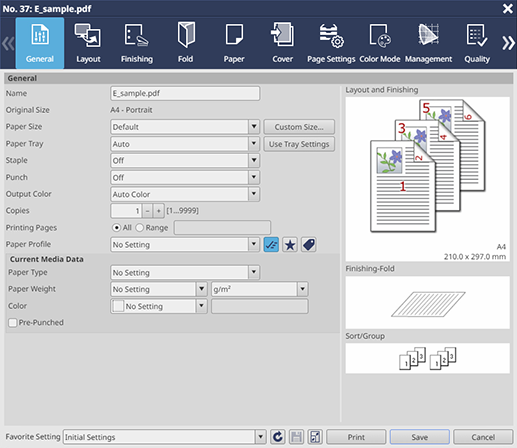
Edit the print setting of a hold job or secure job.
Selecting a tab at the top of the screen displays the target setting screen.
This function allows you to apply the set content and print, or register a print setting as a favorite setting.

Tips
- You can also select multiple jobs and collectively edit them. Up to 500 hold jobs or 20 secure jobs can be edited at once, including a case in which they are accessed from multiple computers.
- When multiple jobs are edited, the job at the top of the job list is displayed on the [Job Settings] screen, and its setting is enabled. However, the setting of each job is enabled for [Original Size], the original orientation, and [Copies].
- A RIPed hold job cannot be edited simultaneously with a hold job without RIP.
- It is possible to edit only PS, PDF, PDF (APPE), TIFF, JPEG, or PPML job.
- A job that consumes more than half of the HDD capacity cannot be saved and printed if the print setting with re-RIP required is edited. Even a job that consumes half or less of the HDD capacity may not be saved or printed depending on the remaining HDD capacity. Delete unnecessary jobs before editing again.
Setting Items
Screen access
AccurioPro Print Manager - Select a job. - [Job Management] - [Job Settings]
Touch panel - [CNTL] - Select a job. - [Job Management] - [Job Settings]
Setting item | Description | |
|---|---|---|
Tab | Collectively displays the frequently used setting items. | |
Configure settings related to the print layout. | ||
Configure settings related to the print finishing. | ||
Configure settings related to print folding. | ||
Allows you to check information such as the paper type and paper size of the paper loaded in the paper tray of this system. | ||
Configure the setting to attach covers to a printout. | ||
Configure settings for the desired paper size or paper tray for each page. | ||
Configure settings related to print color. | ||
Configure settings related to print with special color. | ||
Configure settings related to color setting for color conversion. | ||
Configure settings to optimize the printout quality. | ||
Configure settings related to images, text, and graphics. | ||
Overprints the registered form on original data. | ||
Arbitrarily shifts the print image to adjust its position. | ||
Configure settings to print a crop mark or trim line on printouts. | ||
Configure settings to print the printing date or page number. | ||
Configure the workflow-related setting of the print setting. | ||
Displays setting information of user authentication and account track. | ||
[Favorite Setting] | Select the desired favorite setting from the menu list. | |
 | Reads the setting selected in the [Favorite Setting] menu list. | |
 | Saves the setting as a favorite setting. | |
 | Displays the job in the preview screen. For details about the preview screen, refer to [Preview]. | |
[Print] | Saves the setting, and makes prints. A secure job is deleted after being printed. | |
[Save] | Saves the setting, and closes the screen. If a job other than a hold job without RIP is edited, you can select whether to perform RIP processing when saving. If you click " However, a job for which the following setting is configured in [Layout] cannot be stored in [Save Preview without RIP].
| |
 " of the [Save] button, you can select [Save without RIPing], [Save Preview without RIP], or [Save with RIPing] from the menu list. If you click the [Save] button without selecting it in the menu list, the job is saved in the same RIPed condition as before it was edited.
Tips
- If re-RIP is required after you clicked [Print] or [Save], you can display a confirmation dialog box to notify that re-RIP will be performed before printing or saving. If you want to display a confirmation dialog box, change No.197 to [On] with [Software Switch Setting]. For details, refer to [Software Switch Setting].
Setting Procedure (Saving Settings in [Favorite Setting])
1
Select a job from the [Hold] or [Secure] job list.
2
Click [Job Settings] in [Job Management] to display the setting screen.
You can also select [Job Settings] from the right-click menu to display the setting screen.
You can also double-click a job to display the setting screen.
You can also click "
 " of job information to display the setting screen.
3
Switch the tab, and edit the desired screen.
4
Select [Untitled] from the menu list of [Favorite Setting].
You can enter the name in the entry field of [Favorite Setting] to change the favorite setting name. If you change the name and save the setting, the favorite setting is displayed with the changed setting name in the favorite setting collection on the home screen, the [Favorite Setting] menu list in the Job Settings, and the [Favorite Settings Manager] screen.
5
Enter the favorite name.
6
Click "".
".Tips
The following settings cannot be registered in Favorite Setting.
- [Original Size] and original orientation on the [Layout] screen
- [Use Job Tone Curve] on the [Management] screen
- Each item on the [Authentication] screen
Setting Procedure (Loading the Desired Favorite Setting)
1
Select the desired favorite setting from the [Favorite Setting] menu list.
Selecting [Initial Settings] returns the setting of the currently selected job to the unedited state. Selecting [Default Settings] clears all the settings, and returns to the default.
2
Click "".
".Load the selected favorite setting.
 in the upper-right of a page, it turns into
  and is registered as a bookmark.