


[Favorite Settings Manager]
Overview
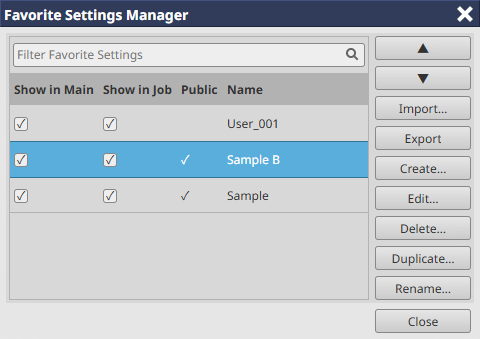
Edit the favorite setting collection on the home screen or the [Favorite Setting] menu list on the Job Settings screen.
You can also import your favorite settings from your computer and export your favorite settings to your computer.

Tips
The following settings cannot be registered in Favorite Setting.
- [Original Size] and original orientation on the [Layout] screen
- [Use Job Tone Curve] on the [Management] screen
- Each item on the [Authentication] screen
Setting Items
Screen access
AccurioPro Print Manager - [Configuration] - [Favorite Settings Manager]
Touch panel - [CNTL] - [Configuration] - [Favorite Settings Manager]
Setting item | Description |
|---|---|
[Show in Main] | Displays the favorite settings you selected the check boxes for in the favorite setting collection on the home screen. |
[Show in Job] | Displays the favorite settings you selected the check boxes for in the [Favorite Setting] menu list on the Job Settings screen. |
[Public] | The favorite settings with the check boxes selected are available to all users. The favorite settings with no check boxes selected can only be used by logged-in users. |
[Name] | Displays the favorite setting name. |
 | Moves up the position to display the favorite settings you selected. |
 | Moves down the position to display the favorite settings you selected. |
[Import...] | Imports the favorite settings from the file written to your computer. |
[Export] | Exports the selected favorite settings to your computer as a file. |
[Create...] | Creates a new favorite setting. On the [Job Settings] screen that is displayed by clicking this, change the settings and save them as a new file.
|
[Edit...] | Changes the contents of the selected favorite setting. On the [Job Settings] screen that is displayed by clicking this, change the settings, then overwrite and save the changes.
|
[Delete...] | Deletes the selected favorite setting. |
[Duplicate...] | Copies the favorite setting. On the [Duplicate Favorite Settings] screen that is displayed by clicking this, enter a name for the copied favorite setting. |
[Rename...] | Changes the name of the favorite setting. On the [Rename Favorite Setting] screen that is displayed by clicking this, enter the name you want to change. |

Reference
- For details about the job setting, refer to What Is [Job Settings]?.
 in the upper-right of a page, it turns into
  and is registered as a bookmark.