


[Front & Back Density]
Overview
Set the transfer output when outputting.
If uneven density occurs when the transfer output is automatically corrected in general use, manually adjust the correction value.
Setting Procedure
1
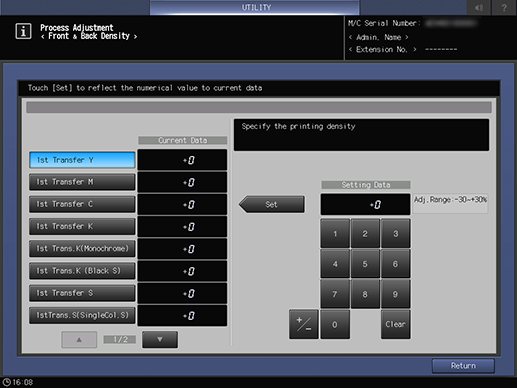
Press the key for the item to be adjusted.
2
Use the on-screen keypad or the Keypad of the Control panel to enter the numeric value.
Use [+ / -] to select the plus or minus of the numeric value. To change [Current Data], press [Set].
[Adj.Range:-30~+30%]
Keypad: Enter the numeric value.
[+ / -]: Sets the plus or minus of the numeric value.
[Clear]: Returns the entered numeric value to "0".
 in the upper-right of a page, it turns into
  and is registered as a bookmark.