


[Color Density]
Overview
The color density control adjusts the halftones of each color to improve color reproduction.

NOTICE
The following setting is required to use this function.
- Set [Use Color Density Control] to [ON].
NOTICE
One of the following options is required to use this function.
- Intelligent Quality Optimizer IQ-601 and Video Interface Kit VI-514
- Relay Unit RU-518m

Reference
- For details about Color Density Control, refer to What Is [Color Density Control]?.
- For details about [Use Color Density Control], refer to [Basic Setting].
Setting Items
Item | Description | |
|---|---|---|
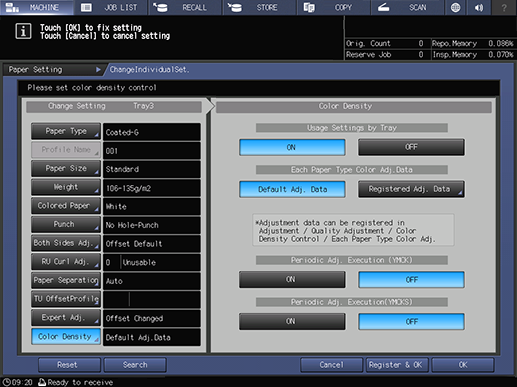
[Usage Settings by Tray] | [ON] | Performs color density control for each tray. |
[OFF] | Does not perform color density control for each tray. | |
[Each Paper Type Color Adj.Data] | [Default Adj. Data] | Corrects the density using the sensor adjustment values (default sensor adjustment values) that are preset in the system. |
[Registered Adj. Data] | Select the registered color sensor adjustment value for each paper type. | |
[Periodic Adj. Execution (YMCK)] | [ON] | Periodically performs the CMYK color density control. |
[OFF] | Does not periodically perform the CMYK color density control. | |
[Periodic Adj. Execution(YMCKS)] | [ON] | Periodically performs color density control for CMYK and special color. |
[OFF] | Does not periodically perform color density control for CMYK and special color. | |
What Is [Each Paper Type Color Adj.Data]?
Set the sensor adjustment value used for output paper density adjustment.
By utilizing the registered [Registered Adj. Data], it is possible to make corrections that take into account different paper characteristics such as plain paper and coated paper.

Tips
- To select [Registered Adj. Data], you need a list of color sensor adjustment values for each paper in which the color sensor adjustment values for each paper are registered. For details about how to register the Each Paper Type Color Sensor Adjustment value, refer to [Each Paper Type Color Adj.].
- Do not use Colored Paper.
Setting Procedure (Setting [Each Paper Type Color Adj.Data])
Set [Registered Adj. Data].
1
Press [Registered Adj. Data].
2
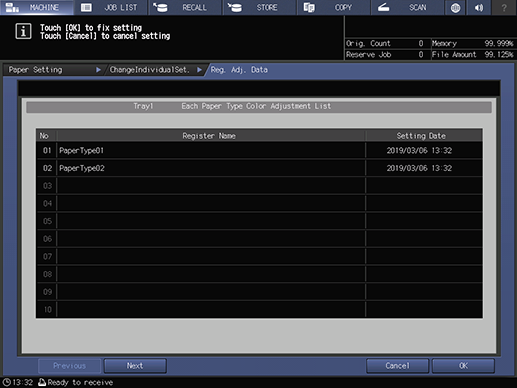
When the [Each Paper Type Color Adjustment List] screen is displayed, select the desired color sensor adjustment value.
3
Press [OK].
 in the upper-right of a page, it turns into
  and is registered as a bookmark.