


[Paper Size]
Overview
Set the standard size or custom size for paper or paper profile, or the paper size for tab paper.
Select the paper size you want to set from [Standard], [Custom], or [Tab Paper].
You can set or register each paper size.

Tips
- If paper loaded in the selected paper tray is measured using the optional Intelligent Media Sensor IM-104 and Intelligent Media Sensor IM-105, [Paper Size] can be set automatically. This function is useful when you do not know the paper size. For details, refer to [Paper Measurement].
- A paper profile that does not match the specifications of the paper tray cannot be set.
- The available sizes vary depending on the optional devices mounted on this system. For details, refer to Optional Part Names and Specifications for Paper Feed.
Setting Procedure (Setting the Detection Size of the Standard Size Paper)
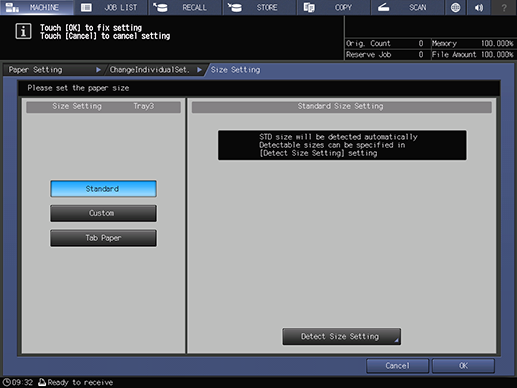
When the standard-size paper is loaded in a paper tray, this system automatically detects and sets the standard size.
When there is a group of sizes in which there is not much difference in sizes and that is difficult to distinguish with this system, prevent erroneous detection by specifying a single size with [Detect Size Setting].
Tips
Setting the Detection Size of the Standard Size
- The indistinguishable paper sizes are separated by columns. The detected standard sizes vary depending on the selected paper tray.
- The [Detect Size Setting] options may vary depending on the K-size use setting. For details about the setting, refer to [K Size].
1
Select [Standard].
2
Press [Detect Size Setting].
3
Select the size to be detected from the paper size groups that are separated by columns.
4
Press [OK].
Setting Procedure (Setting the Custom Paper Size)
1
Select [Custom].
2
Select [(1)] or [(2)], and use the on-screen keypad or Keypad of Control panel to enter the paper size value.
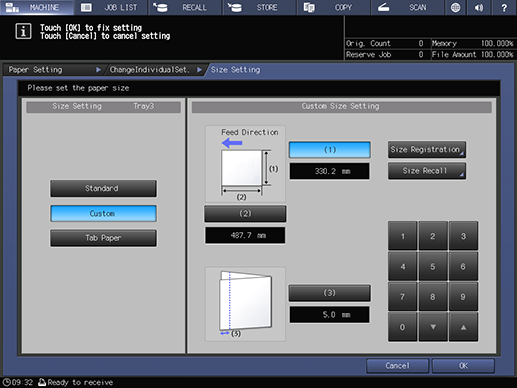
[(3)] is displayed when Saddle Stitcher SD-506 or Saddle Stitcher SD-513 is mounted.
To recall the registered custom size, press [Size Recall] and select the registration number key of the custom size to use.
3
Press [Size Registration].
Registering the frequently used custom sizes saves the time for changing settings and enables the efficient operation of this system.
4
Select the desired registration number key.
Up to 20 types can be registered.
5
Press [Add].
6
Set the name of the custom size to register.
Up to 20 single-byte characters can be entered.
7
Press [OK].
Setting Procedure (Setting the Tab Paper Size and the Number of Sheets)
1
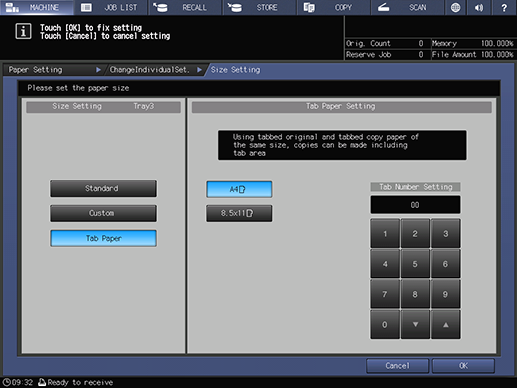
Select [Tab Paper].
2
Select the size for tab paper.
3
Use the on-screen keypad or the Keypad on the Control panel to enter the number of tab paper sheets to insert.
Up to 15 sheets can be set for each copy.
Default: 5 sheets
4
Press [OK].
 in the upper-right of a page, it turns into
  and is registered as a bookmark.