


Cleaning the Spectrophotometer glass of Intelligent Quality Care Unit IQ-501
Overview
When it is time to clean the Spectrophotometer glass of Intelligent Quality Care Unit IQ-501, the following message is displayed on the Touch panel.
[Refer to the User's Guide and clean the spectrophotometer glass. If this screen is being displayed often, contact your service provider.]
If the message is displayed, follow the steps below to clean the Spectrophotometer glass.
Procedure
1
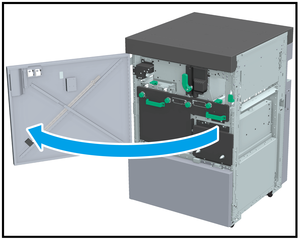
Open the Intelligent Quality Care Unit front door.
2
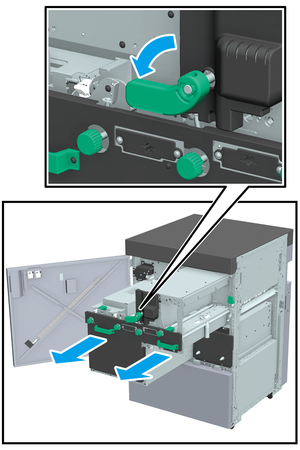
Turn Lever [IQ7] counterclockwise, grasp Handle [IQ8] (2 locations), and pull out the Conveyance section.
3
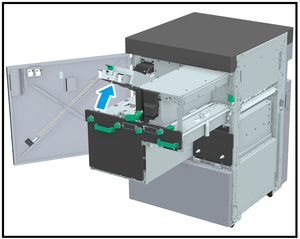
Open Lever [IQ9].
4
Wipe clean the Spectrophotometer glass (A in the figure) using a lint-free, non-woven cloth.
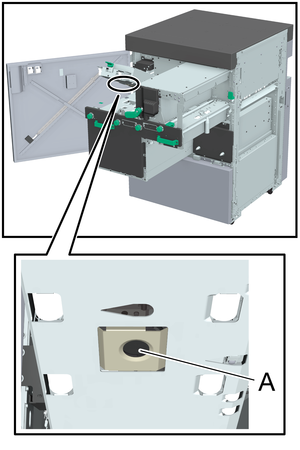
Do not use alcohol or water to clean.

NOTICE
- Do not touch the Spectrophotometer glass with your hands or fingers.
5
Close the Lever [IQ9].
6
Hold Handle [IQ8] (2 locations) and push Conveyance section into the machine, then return the Lever [IQ7] to its original position.
7
Close the Intelligent Quality Care Unit front door.
When paper powder is removed by cleaning, the message disappears, enabling you to use this system.
If the message does not disappear after closing the Intelligent Quality Care Unit front door, clean the Spectrophotometer glass again.
If the message does not disappear after re-cleaning, contact your service representative.
 in the upper-right of a page, it turns into
  and is registered as a bookmark.