


[Adhesive Binding]
Overview
Configure the setting to apply adhesive binding to the paper.

NOTICE
- Folding Unit FD-503 is required to set [Half-Fold] in [Output Setting].

Tips
Adhesive binding is not available when
- the imposed image has a different controller image compression setting (Gradation Priority/Resolution Priority); or
- [Offset Group] or [Group] is selected in [Sort/Group] of [Output Setting].
Tips
- The page order is reversed between [Left Bind] and [Right Bind].

Reference
- For details about [Adhesive Binding], refer to [Adhesive Binding].
- For details about [Binding Position], refer to [Binding Position].
Setting Items
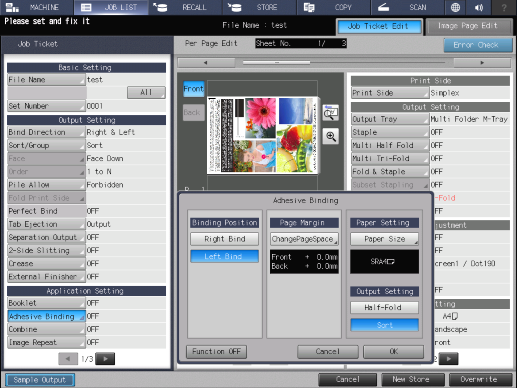
Setting item | Description | |
|---|---|---|
[Binding Position] | [Right Bind] | Sets the adhesive binding direction to Right Bind. |
[Left Bind] | Sets the adhesive binding direction to Left Bind. | |
[Page Margin] | [ChangePageSpace] | Arbitrarily adjust the space between 2 images, and set the binding margin (margin for binding).
|
[Paper Setting] | [Paper Size] | Set the paper size for printing.
|
[Output Setting] | [Half-Fold] | Sets the adhesive binding to Half-Fold when printing. |
[Sort] | Sequentially outputs prints in the same page order as the original by the specified number of sets. [Sort] cannot be changed because it is fixed. | |
[Function OFF] | Turns the function off while maintaining the set information. | |
Setting Procedure (Setting the Page Space)
1
Press [ChangePageSpace].
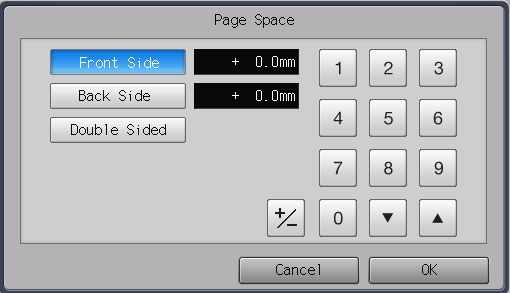
The setting screen is displayed.
2
Press the image side to set.
[Front Side]: Adjusts the image position of [Front Side].
[Back Side]: Adjusts the image position of [Back Side].
[Double Sided]: Simultaneously adjusts the shift amounts of [Front Side] and [Back Side].
3
Use the on-screen keypad to enter the numeric value.
Range: -250.0 mm to 250.0 mm
Pressing [,]/[+] increases or decreases the numeric value in steps of 0.1 mm.
Use [+ / -] to set the plus or minus of the numeric value.
4
Press [OK].
Setting Procedure (Setting the Standard Size)
1
Press [Paper Size].
The setting screen is displayed.
2
Press [Standard].
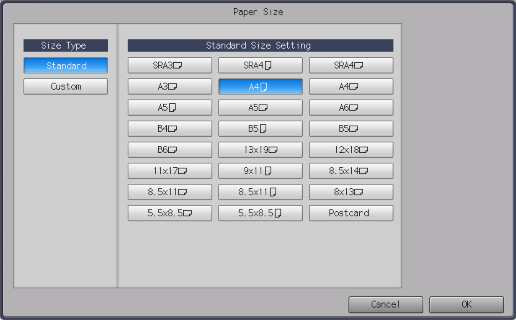
3
Selects the standard size.
4
Press [OK].
Setting Procedure (Setting the Custom Size)
1
Press [Paper Size].
The setting screen is displayed.
2
Press [Custom].
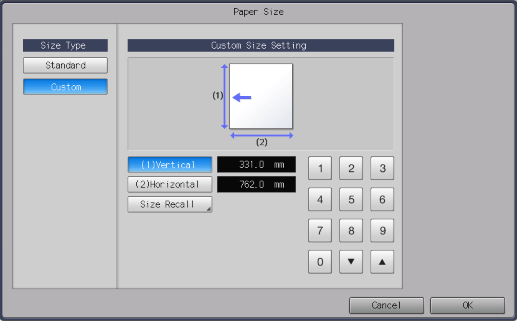
3
Select [(1)Vertical] or [(2)Horizontal], and use the on-screen keypad to enter the numeric value.
The setting range varies depending on the paper feed options mounted on this system and the selected paper tray.
Pressing [,]/[+] increases or decreases the numeric value in steps of 0.1 mm.
To use the custom size registered in this system, press [Size Recall]. For details, refer to Setting Procedure (Setting the Custom Paper Size).
4
Press [OK].
 in the upper-right of a page, it turns into
  and is registered as a bookmark.