


Combining JDF With the Hot Folder Function
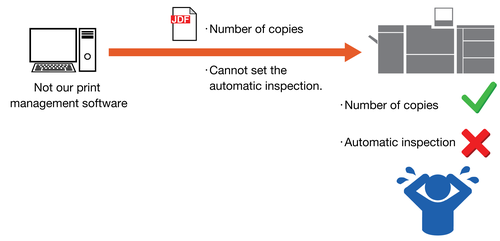
JDF has a standard format, but each company may set its own unique definitions in JDF. As a result, our functions may not work correctly with print management software that is not our product.
This issue can be resolved by combining it with the hot folder function.
By setting the name of the hot folder created in AccurioPro Print Manager in JDF, all hot folder settings, including our proprietary functions, can be reflected in printing. When the settings overlap between JDF and the hot folder, the JDF settings take priority, enabling you to overwrite the hot folder settings.
Below is an example of using our proprietary function (in this case, automatic inspection) with print management software that is not our product.
Issue: Our product's proprietary functions (such as automatic inspection) cannot be set in JDF.
When combined with the hot folder function: Our product's proprietary functions can be added to JDF.
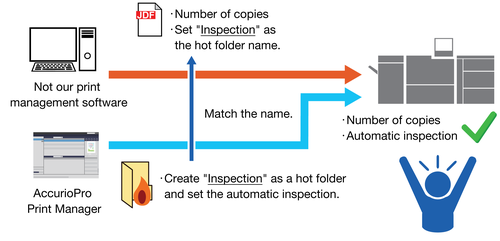
*: The hot folder name in the figure is an example. As long as the folder name is the same in JDF and AccurioPro Print Manager, you can use any name.

Reference
- For details on how to set the JDF and AccurioPro Print Manager hot folder functions in combination, contact your service representative.
 in the upper-right of a page, it turns into
  and is registered as a bookmark.