


JDF Features
Overview
A workflow using JDF has the following features:
Integration of products from different manufacturers into a single workflow
JDF is a standard format, so it can be integrated with a digital printing machine that is not our product. In addition to a digital printing machine, it can also be integrated with print management software that is not our product.
Operational efficiency improvement by automating the printing process
A workflow using JDF allows you to manage the entire workflow using print management software, automating the printing process. For example, when this system receives print settings and production instructions sent in JDF from print management software, printing starts automatically.
Reduction in human error by automating print settings
The JDF received by this system already contains various setting items such as the number of copies, so manual settings are not required to print on this system, reducing human error.
Integration with a printing business support system and a monitoring and analysis system
Integrating with a printing business support system makes cost management more efficient. In addition, integrating with a monitoring and analysis system allows you to check the production progress in real time. You can centrally manage information in the workflow to build a core system that provides a comprehensive overview from a quotation to a delivery.
Even if you are using a proprietary system, a customer engineer (CE) may be able to modify the system to integrate it with our digital printing machine.

Reference
- For details on integration with a digital printing machine and print management software that are not our products, printing business support system, monitoring and analysis system, etc., please contact your service representative.
- For details on how to change various settings required to integrate with your proprietary system, please contact your service representative.
Workflow Using JDF
The following figure shows an example of a workflow in which the print management software integrates with various printing machines, etc. using JDF.
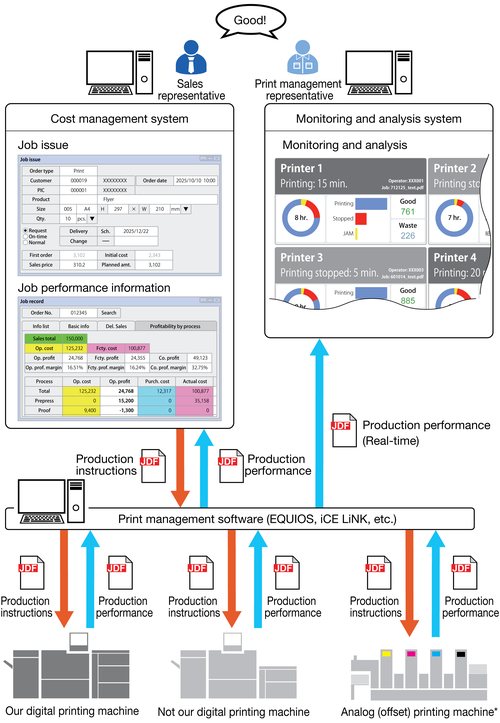
*: In a workflow for analog (offset) printing machine, you need to prepare printing plates using CTP or other methods before printing. This is omitted from the figure above.
 in the upper-right of a page, it turns into
  and is registered as a bookmark.