


Configuring Security Settings
Configure security settings for Auto Inspection Unit UK-301. Implement any required measures for your environment.
Configure the settings by going to Control panel - Utility/Counter - [Administrator Setting] - [Security Setting (UK-301)].
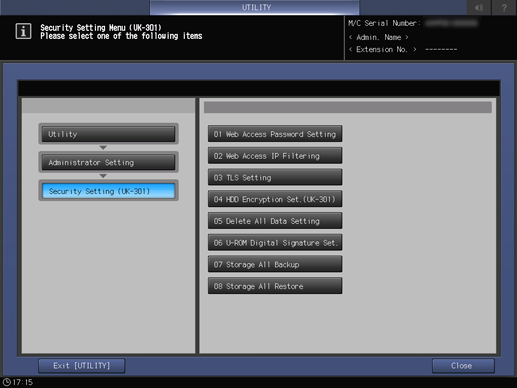
Setting item | Description |
|---|---|
[Web Access Password Setting] | Set the Web Utilities password for Auto Inspection Unit UK-301. |
[Web Access IP Filtering] | Set Web Utilities IP filtering for Auto Inspection Unit UK-301. Setting the available range of IP address restricts accesses from IP addresses out of range. It is also possible to link subnet masks. |
[TLS Setting] | Set the encryption of Auto Inspection Unit UK-301 network communications. |
[HDD Encryption Set.(UK-301)] | Set the HDD encryption function of Auto Inspection Unit UK-301. Set the encryption password to use. |
[Delete All Data Setting] | Select [Erase Mode] to overwrite and delete the Auto Inspection Unit UK-301 HDD data or non-volatile memory data with other specific data. |
[U-ROM Digital Signature Set.] | Configure the setting to enable the digital signature verification function for Auto Inspection Unit UK-301 firmware. |
[Storage All Backup] | Back up data (reference images and automatic inspection reports) in the Auto Inspection Unit UK-301 HDD to a USB external storage device. |
[Storage All Restore] | Select [Storage All Backup] to back up data in the Auto Inspection Unit UK-301 HDD to an external storage device, and restore the data to the Auto Inspection Unit UK-301 HDD. |
For details, refer to [Security Setting (UK-301)].

NOTICE
- If [HDD Encryption Set.(UK-301)] is enabled when a reference image or non-created automatic inspection reports already exists, the system may not function correctly, including the system freezing when the reference image is displayed.
- Delete any reference images or non-created automatic inspection reports when [HDD Encryption Set.(UK-301)] is enabled.
 in the upper-right of a page, it turns into
  and is registered as a bookmark.