


[Media Sensor Adjustment] - [Size Detec. Sens. Init. Adj.]
Overview
Adjust the Media Sensor size detection sensor.
The size measurement accuracy of the Media Sensor can be improved by measuring the paper size with a scale and setting the actual measured value.

NOTICE
All the following options are required to use this function.
- Intelligent Media Sensor IM-104
- Intelligent Media Sensor IM-105
Setting Procedure
1
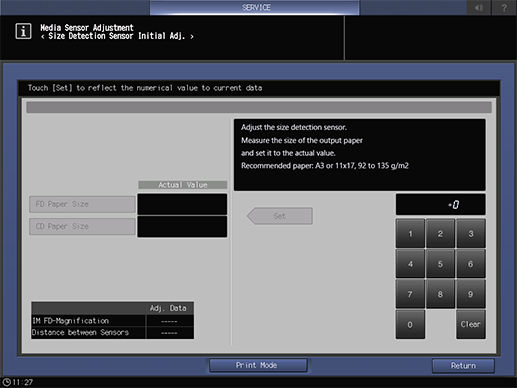
Press [Print Mode].
2
Load A3 w or 11 e 17 w paper into any paper tray, and select that paper tray.
3
Press Start on the Control panel.
Paper is measured and output from the Purge tray of Intelligent Media Sensor IM-104.
4
Press [Exit PrintMode] to return to the setting screen.
5
Measure the measured paper using a scale.
6
Select [FD Paper Size] or [CD Paper Size].
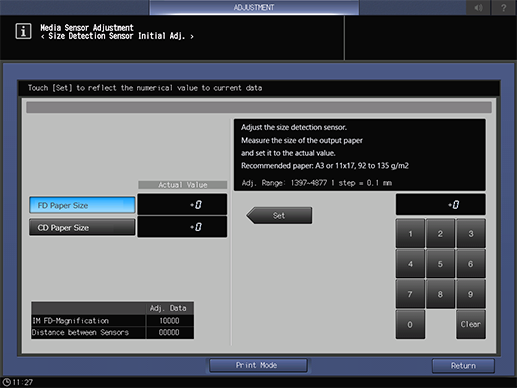
Select the item to input the value measured in step 5.
7
Use the on-screen keypad or the Keypad of the Control panel to enter the numeric value.
To change [Actual Value], press [Set].
[FD Paper Size]: [Adj. Range: 1397~4877 1 step = 0.1 mm]
[CD Paper Size]: [Adj. Range: 1000~3302 1 step = 0.1 mm]
8
If [Adj. Data] of [IM FD-Magnification] or [Distance between Sensors] is displayed at the bottom left of the screen, press [Return] to finish adjustment.
 in the upper-right of a page, it turns into
  and is registered as a bookmark.