
Loading Paper into the LCT (built-in)
The following example explains how to load paper into the optional Paper Feed Cabinet PC-416 (LCT (built-in)).
1
Pull out the LCT (built-in) tray.
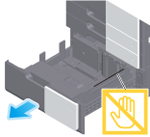

NOTICE
- Be careful not to touch the Film.
2
Load paper into the right side of the LCT (built-in) tray so that the side to be printed faces up.
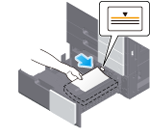
When printing on letterhead (paper where company names, preset text, and other text or images are already printed), load it with the print side facing down.
For details on the available paper, refer to Paper.
NOTICE
- Do not load an excessive number of sheets such that the top of the stack is higher than the
 mark.
mark. - Do not load the LCT (built-in) tray with paper of a size other than that previously specified. When changing the paper size, contact your service representative.
- If paper is curled, flatten it before loading it.
3
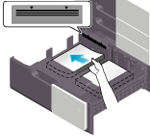
Load paper into the left side of the LCT (built-in) tray so that the side to be printed faces up.
4
Close the LCT (built-in) tray.
When you change the paper type, proceed to step 5 to change the setting on this machine.
When you do not change the paper type when adding paper, you can use the current setting without making any changes.
5
Change tray paper settings on the Paper Settings screen.
For details, refer to Changing Tray Paper Settings on the Control Panel.
 in the upper-right of a page, it turns into
  and is registered as a bookmark.