
Loading Paper into Tray 1 to Tray 4
How to load paper into Tray 1 to Tray 4
The procedure for loading paper is common between Tray 1 to Tray 4. The following explains how to load paper into Tray 1. Tray 3 and Tray 4 are optional.
1
Pull out Tray 1.
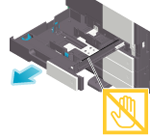

NOTICE
- Be careful not to touch the Film.
2
Slide the Lateral Guide to fit the size of the loaded paper.
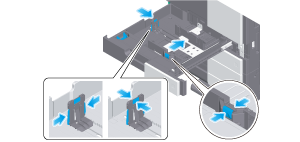
For Tray 1, mount the Attachment on the Lateral Guide, and slide the Lateral Guide.
3
Load paper into the tray with the print side facing up.
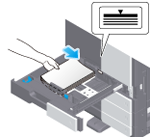
When printing on letterhead (paper where company names, preset text, and other text or images are already printed), load it with the print side facing down.
For details on the available paper, refer to Paper.
NOTICE
- Do not load an excessive number of sheets such that the top of the stack is higher than the
 mark.
mark. - If paper is curled, flatten it before loading it.
4
Close Tray 1.
When you change the paper type or change to custom size paper, proceed to step 5 to change the setting on this machine.
When you do not change the paper type or change to custom size paper when adding paper, you can use the current setting without making any changes.
5
Change tray paper settings on the Paper Settings screen.
For details, refer to Changing Tray Paper Settings on the Control Panel.
Loading postcards
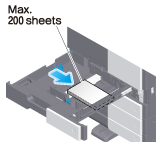
Up to 200 postcards can be loaded into the Tray 1. The following example explains how to load a postcard of 100 mm e 148 mm (4 e 6, A6 Card).
1
Pull out Tray 1.
2
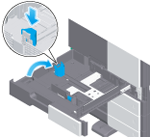
Mount the Attachment on the Lateral Guide.
3
When loading postcards into the Tray 1, note the following points.
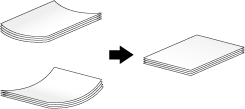
When loading curled postcards, uncurl the postcards as shown in the figure in advance.
4
With the print side facing up, load postcards in the w direction as shown in the figure.
5
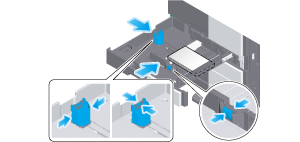
Slide the Lateral Guide to fit the size of the loaded paper.
6
Close Tray 1.
7
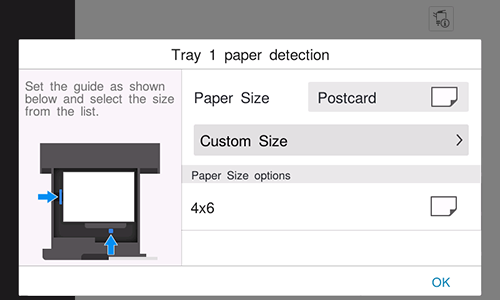
Select [Postcard] from [Paper Size options].
8
Tap [OK].
Loading envelopes
Up to 70 envelopes can be loaded into the Tray 1.
Image of a long envelope

Image of a Western-style envelope

1
Pull out Tray 1.
2
When loading envelopes of which the length is 182 mm (7-3/16 inches) or less, mount the Attachment on the Lateral Guide.
3
When loading envelopes into the Tray 1, note the following points.
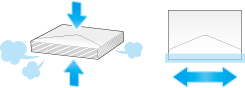
Do not use envelopes that have glue or release paper on the flap or the part covered by the flap on the body. Otherwise, the machine may be damaged or a failure may occur.
When loading envelopes, remove air from them, and securely press along the flap fold line. Otherwise, it will result in an envelope wrinkle or paper jam.
4
Position the flap part face down, and load envelopes as shown in the figure.
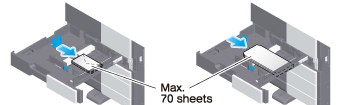
The flap side of envelopes cannot be printed on.
5
Slide the Lateral Guide to fit the size of the loaded paper.
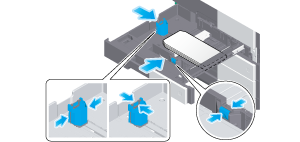
6
Close Tray 1.
7
Change tray paper settings on the Paper Settings screen.
For details, refer to Changing Tray Paper Settings on the Control Panel.
Various sizes of envelopes are available. Specify the correct paper size for the envelopes you have loaded.
NOTICE
- When loading envelopes with flaps opened, also select the standard size that matches them. You do not have to measure the size of the envelope with the flap opened to set the size as a custom-sized envelope.
 in the upper-right of a page, it turns into
  and is registered as a bookmark.