
Finisher FS-542/Punch Kit PK-527
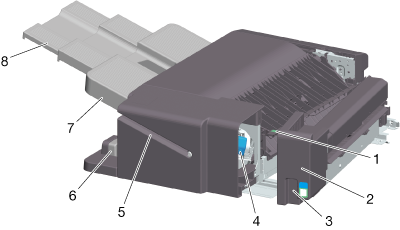
No. | Name | Description |
|---|---|---|
1 | Cover [FS2] | Open this cover when removing paper that caused a paper jam in the finisher. |
2 | Punch Kit | You can punch printed sheets for filing by installing the Punch Kit in the finisher. |
3 | Handle [FS1] | Hold this when opening the Punch Kit. |
4 | Staple Cartridge | Pull out this cartridge from the finisher when clearing a staple jam or replacing a staple cartridge. |
5 | Manual Staple | Used to manually staple printed sheets at the corner. For details, refer to Using Manual Staple of Finisher FS-542. |
6 | Lock Release Lever | Used to release and move the finisher and main unit when clearing a paper jam. |
7 | Output Tray | Outputs printed pages. |
8 | Tray Extension | Pull this tray out when handling paper longer than A4 (8-1/2 e 11) w. |
 in the upper-right of a page, it turns into
  and is registered as a bookmark.