
Optional Components
List of optional components
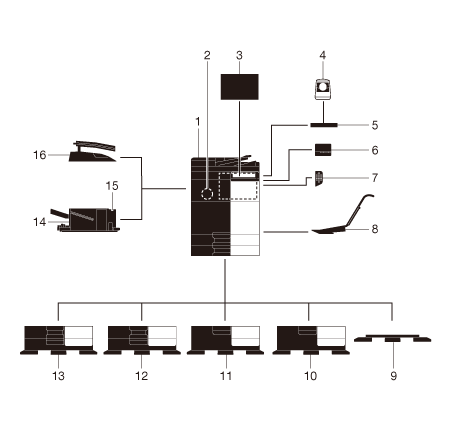
No. | Name | Description |
|---|---|---|
1 | Main unit | Scans the original in the scanner section, and prints a scanned image in the printer section. This unit is referred to as "this machine" or "the main unit" in the manual. |
2 | Fax Kit FK-514 | Used to operate this machine as a fax machine. |
3 | Clean Unit CU-102 | Collects small particles (UFP) generated in this machine to prevent them from escaping this machine. |
4 | Authentication Unit AU-102 | Performs user authentication by scanning vein patterns in the finger. Working Table WT-520 is required to install Authentication Unit AU-102. This unit is referred to as Biometric Authentication Unit in the manual. |
5 | Working Table WT-520 | Provides an area to temporarily place an original or other materials. This is also used when Authentication Unit AU-102 or Finisher FS-P04 is installed. |
6 | Finisher FS-P04 | Staples the printed sheets. For staples, use Staple Kit SK-501. Working Table WT-520 is required to install Finisher FS-P04. For details on how to use Finisher FS-P04, refer to How to Use the Finisher FS-P04. |
7 | Keypad KP-P03 | It is equipped on the side of the Control Panel. Allows you to operate this machine or enter a number by using hardware keys. |
8 | Mount Kit MK-730 | Used to print data on banner paper. This unit is referred to as Banner Paper Loading Guide in the manual. |
9 | Desk DK-705 | Used to install this machine on the floor. This unit is referred to as Desk in the manual. |
10 | Desk DK-516 | Used to install this machine on the floor. This unit is referred to as Desk in the manual. |
11 | Paper Feed Cabinet PC-416 | Allows you to load up to 2500 sheets of A4 (8-1/2 e 11) size. This unit is referred to as LCT (built-in) in the manual. |
12 | Paper Feed Cabinet PC-216 | Allows you to load up to 500 sheets respectively in the top and bottom trays. This unit is referred to as Double Paper Feed Cabinet in the manual. |
13 | Paper Feed Cabinet PC-116 | Allows you to load up to 500 sheets in the top tray and use the bottom tray as a storage box. This unit is referred to as Single Paper Feed Cabinet in the manual. |
14 | Finisher FS-542 | Install this unit onto the output tray of this machine. Sorts, groups and staples printed paper before outputting it. |
15 | Punch Kit PK-527 | Install this unit onto Finisher FS-542. This unit supports the punching function. |
16 | Job Separator JS-506 | Install this unit onto the output tray of this machine. This unit sorts printed sheets. |
List of other optional components
The following options are built into this machine and are not shown in the figure.
No. | Name | Description |
|---|---|---|
1 | Local Interface Kit EK-608 | Install this unit when using the voice guidance function. The speaker and USB port are added. This unit is referred to as Local Interface Kit in the manual. |
2 | Local Interface Kit EK-609 | Install this unit when using the voice guidance function or the connection function with a Bluetooth LE-compatible iOS terminal. The speaker, USB port, and receiving device for Bluetooth LE communication are added. This unit is referred to as Local Interface Kit or Local Interface Kit (voice guidance / Bluetooth LE compatible) in the manual. |
3 | Local Interface Kit EK-P10 | Install this unit to link this machine with an NFC-compatible Android terminal. A receiving device for NFC communication is added. This unit is referred to as Local Interface Kit (NFC compatible) in the manual. |
4 | i-Option LK-104 | Allows you to add the voice guidance function. |
5 | i-Option LK-105 | Allows you to add the searchable PDF function. |
6 | i-Option LK-106 | Used to add a bar code font that is one of the special fonts. |
7 | i-Option LK-107 | Used to add a Unicode font that is one of the special fonts. |
8 | i-Option LK-108 | Used to add an OCR font that is one of the special fonts. In the standard, the OCR-B font (PostScript) is available. Installing this option allows a use of the OCR-A font (PCL). |
9 | i-Option LK-110 | Allows you to convert a file into the DOCX or XLSX type or generate a high functionality and the high-quality data generation function. This option includes the function licenses for i-Option LK-105. To purchase this option, you do not need to purchase i-Option LK-105. |
10 | i-Option LK-111 | Allows you to add the ThinPrint function. |
11 | i-Option LK-114 | Allows you to add the serverless pull printing function. |
12 | i-Option LK-115 | Allows you to add TPM (Trusted Platform Module). Security enhancement is realized by encrypting confidential information such as certificates and passwords of this machine. |
13 | i-Option LK-116 | Allows you to add the virus scan function. |
14 | Upgrade Kit UK-221 | Allows you to use this machine in a wireless network environment. This unit is referred to as Wireless LAN Interface Kit in the manual. |
15 | Heater HT-509 | Prevents paper in a paper tray from being affected by humidity. Heater HT-509 can be mounted when you purchase Paper Feed Cabinet PC-116/PC-216/PC-416. |
16 | Power Supply BOX MK-734 | Used to turn Heater HT-509 operations on or off. Power Supply BOX MK-734 can be mounted when you purchase Paper Feed Cabinet PC-116/PC-216/PC-416 or Desk DK-516. |
17 | Mount Kit MK-735 | Required to have IC Card Authentication Unit built in to the main unit. |
Front
The illustration shows the main unit with Paper Feed Cabinet PC-416.
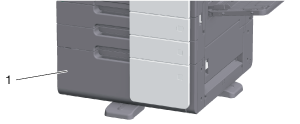
No. | Name | Description |
|---|---|---|
1 | LCT (built-in) | Allows you to load up to 2500 sheets of plain paper. |
The illustration shows the main unit with Paper Feed Cabinet PC-216 or Paper Feed Cabinet PC-116.
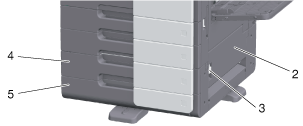
No. | Name | Description |
|---|---|---|
2 | Bottom Right Door | Open this door when clearing a paper jam in Tray 3 or Tray 4 transport unit. |
3 | Bottom Right Door Release Lever | Used to lock the Bottom Right Door. |
4 | Tray 3 | Allows you to load up to 500 sheets of plain paper. |
5 | Tray 4/Storage Box | Used as a Storage Box when installing Single Paper Feed Cabinet. This box allows you to load up to 500 sheets of plain paper when Double Paper Feed Cabinet is installed. |
Side/rear
The illustration shows the main unit with Paper Feed Cabinet PC-216, Fax Kit FK-514, Power Supply BOX MK-734, and Clean Unit CU-102.
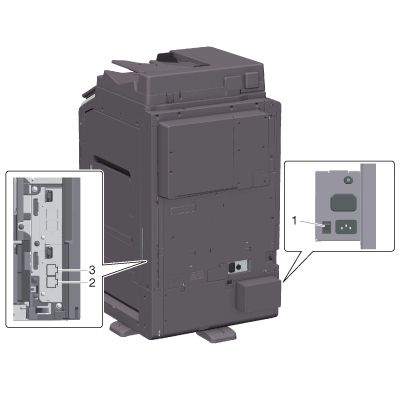
No. | Name | Description |
|---|---|---|
1 | Heater Power Switch | Used to turn Heater operations on or off. This function prevents paper from being affected by humidity when the power is turned on. The Heater is available when you purchase Paper Feed Cabinet PC-116/PC-216/PC-416 or Desk DK-516. |
2 | Jack for connecting a telephone (TEL PORT1) | Used to connect a telephone cord. |
3 | Telephone Jack 1 (LINE PORT1) | Used to connect a general telephone subscriber line. |
 in the upper-right of a page, it turns into
  and is registered as a bookmark.