
Cleaning the Print Head Glass
Printing quality deteriorates if the Print Head Glass is dirty. If this occurs, clean the Print Head Glass according to the following procedure.
1
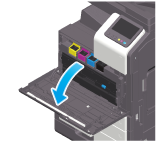
Open the Front Door of the machine.
2
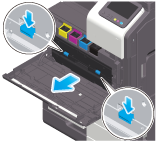
Remove the Waste Toner Box.
3
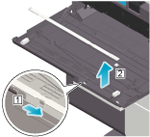
Remove the Printhead Cleaner from the Front Door of this machine.
4
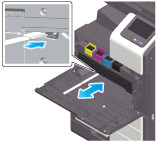
Slowly insert the Printhead Cleaner all the way to the back end of the Print Head Glass, and then slowly pull it out.
Repeat this operation approximately three times for all the Print Head Glass sections.
Repeat this operation approximately three times for all the Print Head Glass sections.
5
Mount the Printhead Cleaner onto the Front Door of this machine.
6
Mount the Waste Toner Box.
7
Close the Front Door of the machine.
 in the upper-right of a page, it turns into
  and is registered as a bookmark.