Types of Connection Methods
The following connection methods are provided for wireless LAN.
(1) Wired + Wireless (Secondary Mode)
This is a connection method that enables use of this machine in both wired and wireless LAN environments. This machine runs as a wireless LAN adapter in a wireless LAN environment.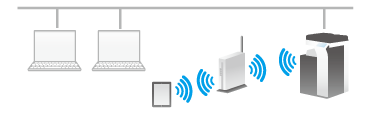
(2) Wireless (Secondary Mode) Only
This is a connection method that enables use of this machine only in a wireless LAN environment. This machine runs as a wireless LAN adapter in a wireless LAN environment.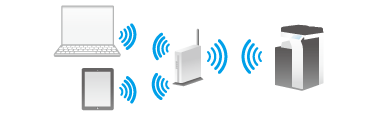
(3) Wired + Wireless (Primary Mode)
This is a connection method that enables use of this machine in both wired and wireless LAN environments. This machine runs as a wireless LAN access point in a wireless LAN environment.
When this machine is used as a wireless LAN access point, the terminal that is compatible with a wireless LAN can be connected to this machine without using an existing network. This allows you to configure a wireless LAN environment that is separate from the wired LAN environment.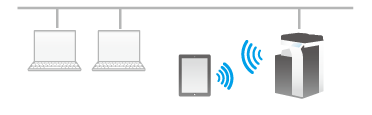
(4) Wired + Wireless (Wi-Fi Direct)
This is a connection method that enables use of this machine in both wired and wireless LAN environments. This machine runs as a Wi-Fi Direct group owner in a wireless LAN environment.
You can directly connect a terminal that is compatible with a wireless LAN to this machine by operating this machine as a Wi-Fi Direct group owner. This allows you to configure a wireless LAN environment that is separate from the wired LAN environment.
 Tips
Tips In some areas, an option is required to use this function. For details on the required option, refer to [Communication options] .