
Copy Settings ([Scan Setting])
Specifying the original binding position ([Binding Position])
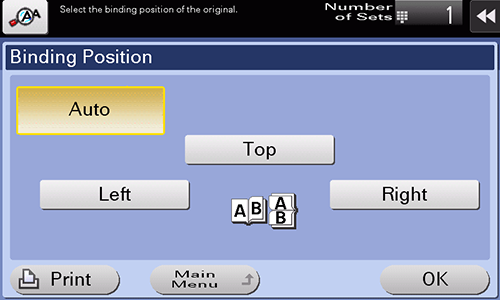
Specify the binding position to suit the orientation of the target original.
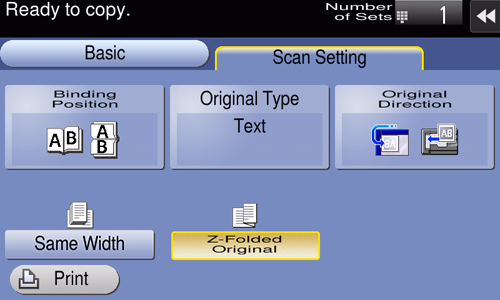
Select [Scan Setting] - [Binding Position] to configure settings.
Setting | Description |
|---|---|
[Auto] | Automatically configures the binding position of the original.
|
[Top] | Select this option when the binding position is set to the top of the original. |
[Left] | Select this option when the binding position is set to the left of the original. |
[Right] | Select this option when the binding position is set to the right of the original. |
Selecting the appropriate image quality level for the original ([Original Type])
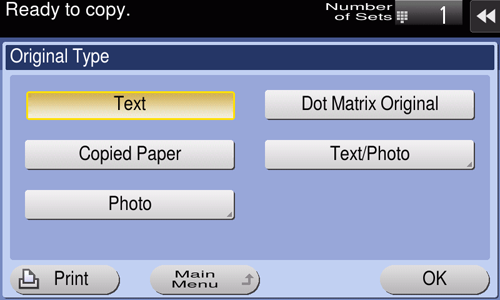
Select the optimum settings for the original to copy it at the optimum image quality.
Select [Scan Setting] - [Original Type] to configure settings.
Setting | Description |
|---|---|
[Text] | Copies an original, which consists primarily of text, at the optimum image quality level. This function sharpens the edges of each character, creating easy-to-read images. |
[Dot Matrix Original] | Copies an original, that primarily consists of text such as thin or faint characters, at the optimum image quality level. This function reproduces text using high pixel density, creating easy-to-read text. |
[Copied Paper] | Copies the original, which is output with an even density from the copier or printer, at the optimum image quality level. |
[Text/Photo] | Copies the original, which consists of text and photos, at the optimum level of image quality. This function sharpens the edges of each character and reproduces smoother photos.
|
[Photo] | Copies an original consisting only of photos at the optimum image quality level.
|
Specifying the original loading direction ([Original Direction])
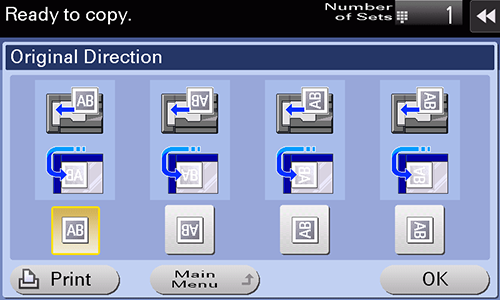
When scanning a 2-sided original, specify the original loading direction so that the vertical direction of the scanned original is set correctly.
Select [Scan Setting] - [Original Direction] to configure settings.
Scanning originals of different sizes ([Same Width])
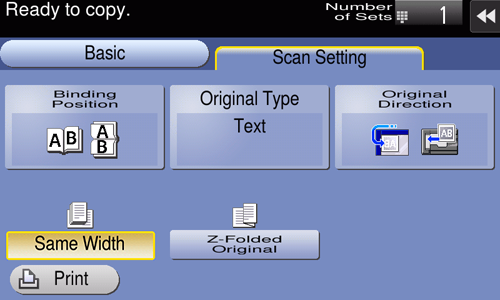
Even for an original with pages of different sizes, when the width of the original to be scanned is the same, by using the ADF, you can scan data while detecting the size of each page.
Select [Scan Setting] - [Same Width] to configure settings.

NOTICE
- Load all the original pages into the ADF so that the tops of the pages are at the back or left side of the machine.
Scanning originals with folds ([Z-Folded Original])
If a folded original is loaded into the ADF, the original size may not be detected accurately. When [Z-Folded Original] is specified, the original size can be accurately detected even for the folded original sheets.
Select [Scan Setting] - [Z-Folded Original] to configure settings.
NOTICE
- Unfold the folded original sheets before loading them into the ADF. If a folded original is not unfolded before scanning, a paper jam may occur or the size may not be correctly detected.
 in the upper-right of a page, it turns into
  and is registered as a bookmark.