User's Guide

Loading paper in Tray 3 or Tray 4
You can load a larger amount of paper into Tray 3 or Tray 4 than Tray 1 or Tray 2. It will be convenient to load the most frequently used paper into Tray 3 or Tray 4. The following explains how to load paper into Tray 3.
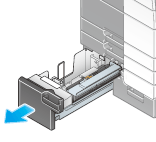
- Pull out Tray 3.
- Lift the Paper Feed Rollers, and load the paper with the required side facing upward.
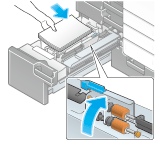
- When printing on letterhead (paper where company names, preset text, and other text or images are already printed), load it with the print side facing down.
- For details on the available paper sizes, refer to Here.
- Lower the Paper Feed Rollers, then close Tray 3.
- When loading paper other than plain paper, change the paper type setting.
- For details, refer to Here.
