
Automatically deleting files from a User Box
For all the Public User Boxes, Personal User Boxes, and Group User Boxes, the administrator specifies the time to automatically delete files from the date/time the files were last printed or sent.
This delete time is used as the time to delete files from an existing User Box and from a User Box you will create.
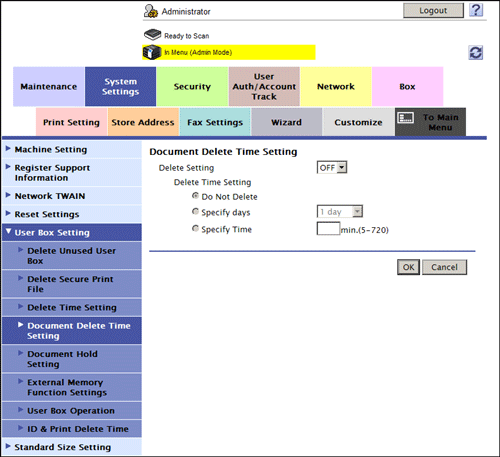
In the administrator mode, select [System Settings] - [User Box Setting] - [Document Delete Time Setting], then configure the following settings.
|
Settings |
Description |
|---|---|
|
[Delete Setting] |
Allows the administrator to set the time to delete files from User Boxes automatically. If you set to [ON], you cannot set a file delete time for each User Box when the box is created by a user. [OFF] is specified by default. |
|
[Delete Time Setting] |
Sets a time to automatically delete files from a User Box.
|