
Changing Annotation User Box settings
If you log in to the administrator mode, you can change settings for a registered Annotation User Box or delete it without entering the password for the Annotation User Box.
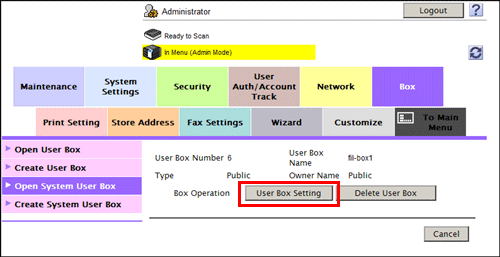
In the administrator mode, select [Box] - [Open System User Box] - [Annotation User Box], to select a user box.
Click [User Box Setting].
Clicking [Delete User Box] deletes the User Box you selected.
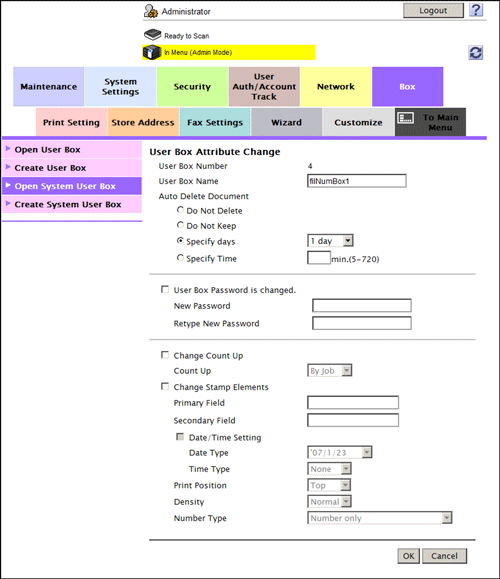
Use [User Box Attribute Change] to change User Box settings.
Settings
Description
[User Box Name]
Change the User Box name (using up to 20 characters).
[Auto Delete Document]
Change the period from the date/time when a file was saved in, last printed, or sent form a User Box to the date/time when it is to be deleted automatically.
[Do Not Delete]: Keeps the file in the User Box.
[Do Not Keep]: Select this option to use a document to give an annotation only without saving or using it for copying.
[Specify days]: Select the number of days until the file is automatically deleted.
[Specify Time]: Enter the time period before the file is automatically deleted.
[User Box Password is changed.]
To change the password of a User Box, select this check box, then enter a new password (using up to 64 characters, excluding ").
[Change Count Up]
To change the Count Up method, select this check box, and change settings.
[By Job]: Adds a number per file. Even if a file has multiple pages, a same number is added to the file as one job.
[By Page]: Adds a number per page.
[Change Stamp Elements]
To change Stamp Elements, select this check box, and change settings.
[Primary Field]: Add any text (up to 40 characters).
[Secondary Field]: Add any text at the beginning of the annotation (using up to 20 characters).
[Date/Time Setting]: Select the format for the date and time.
[Print Position]: Select a position in which the annotation is printed.
[Density]: Select the density of characters of the date and time and annotation to be printed.
[Number Type]: Select the digit number of annotation.