
Using the PC-Fax RX Function
PC-Fax RX is a function that automatically saves a received fax to the Memory RX User Box or a user box specified in F-Code (SUB Address).
A stored fax job can be read from the user box into a computer.

-
This function cannot be used together with the following functions.
Memory RX, Forward TX, TSI Routing -
When multiple lines are used, you can select [Fax Settings] - [TX/RX Settings] - [Individual Receiving Line Setup] in the administrator mode to enable the PC-Fax RX function for each line.
-
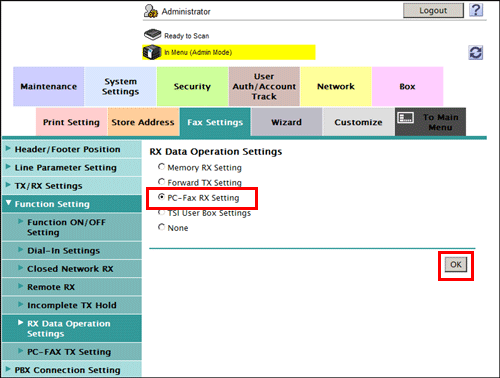
In the administrator mode, select [Fax Settings] - [Function Settings] - [RX Data Operation Settings] - [PC-Fax RX Setting], then click [OK].
-
When multiple lines are used, select the line for which the PC-Fax RX function is set, and click [Edit].
-
When using a single line, go to Step 3.
-
-
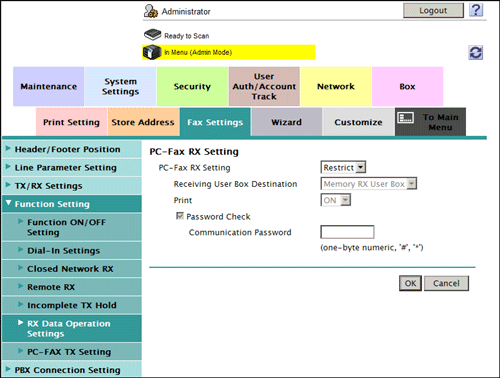
At [PC-Fax RX Setting], configure the following settings.
Settings
Description
[PC-Fax RX Setting]
Select [Allow] to use the PC-Fax RX function.
[Restrict] is specified by default.
[Receiving User Box Destination]
Select the location where you want to a received fax saved from [Memory RX User Box] or [Specified User Box] (a User Box specified in F-Code (SUB Address)).
[Memory RX User Box] is specified by default.
[Print]
Select whether to print a received fax after it has been received.
[ON] is specified by default.
[Communication Password]
If you select [Specified User Box] for [Receiving User Box Destination], specify whether to check the communication password (Sender ID) for PC-Fax reception.
To confirm the communication password, select the [Password Check] check box, then enter a communication password (using up to eight digits, including symbols # and *).