
Changing Print Settings When Receiving a Fax
Change print settings for faxes received on this machine In addition, specify how to handle files in a polling transmission.
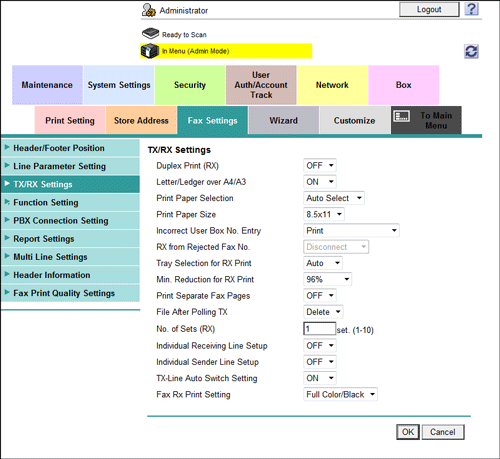
In the administrator mode, select [Fax Settings] - [TX/RX Settings], then configure the following settings.
|
Settings |
Description |
|---|---|
|
[Duplex Print (RX)] |
Select whether to print an original on both sides of paper when multi-page fax is received. This option is not available if [Print Separate Fax Pages] is set to [ON]. [OFF] is specified by default. |
|
[Letter/Ledger over A4/A3] |
Select whether to preferentially print an original on inch-sized paper when a fax is received. [OFF] is specified by default. This item is not displayed for Taiwan models. |
|
[Print Paper Selection] |
Select the criterion of selecting paper for printing a fax.
[Auto Select] is specified by default. |
|
[Print Paper Size] |
Select size of paper for printing received fax. The initial value varies depending on the setting for [Letter/Ledger over A4/A3]. |
|
[Incorrect User Box No. Entry] |
Select the action taken by the machine if unregistered user box is specified for receiving a fax using the machine's box.
[Print] is specified by default. |
|
[Tray Selection for RX Print] |
Specify a paper tray if you want to fix the paper tray used to print a fax. [Auto] is specified by default. |
|
[Min. Reduction for RX Print] |
If necessary, change the reduction ratio that is used when printing a fax. [96%] is specified by default. |
|
[Print Separate Fax Pages] |
Select whether to print a fax longer than the standard size on separate pages. This option is not available if [Duplex Print (RX)] is set to [ON]. [OFF] is specified by default. |
|
[File After Polling TX] |
Select whether to delete a file after it is sent in response to a polling request if Polling TX is used to register files for polling. [Delete] is specified by default. |
|
[No. of Sets (RX)] |
If necessary, change the number of copies to print a fax. [1] is specified by default. |
|
[Individual Receiving Line Setup] |
Select whether to specify a fax receiving operation for each line when multiple lines are used. If [ON] is selected, the TSI Routing function, Forward TX function, Memory RX function, Closed Network RX function, or PC-Fax RX function can be specified for each line. [OFF] is specified by default. |
|
[Individual Sender Line Setup] |
Specify whether to use a different sender name for each line when multiple lines are used. [OFF] is specified by default. |
|
[TX-Line Auto Switch Setting] |
Specify whether to automatically switch to the required line when the required line is not specified to send a fax while multiple lines are used.
If the line specified to send a fax is not available, the job is discarded. [ON] is specified by default. |
|
[Fax RX Print Setting] |
Select whether to print a received network fax in color or black and white. To restrict the print to only black and white print, select [Black Only]. [Full Color/Black] is specified by default. |