
Specifying the default PCL print settings
Configure the PCL settings. Specify the default values for PCL symbol set.
In the administrator mode, select [Print Setting] - [PCL Setting], then configure the following settings.
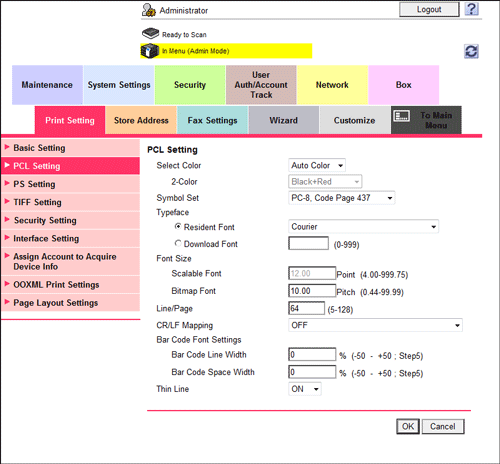
|
Settings |
Description |
|---|---|
|
[Select Color] |
Select colors for printing.
[Auto Color] is specified by default. |
|
[Symbol Set] |
Select the font symbol set to be used. [PC-8, Code Page 437] is specified by default. |
|
[Typeface] |
Select Resident Font or Download Font to specify the font to be used.
[Courier] is specified by default. |
|
[Font Size] |
Specify the default font size value.
|
|
[Line/Page] |
Enter the number of lines of text data to be printed on one page. [64] is specified by default. |
|
[CR/LF Mapping] |
Select whether to replace the line feed codes when printing text data. When you want to replace the line feed codes, select the replacement method. [OFF] is specified by default. |
|
[Bar Code Font Settings] |
Configure settings for the bar code font.
This option is displayed when the optional Upgrade Kit UK-204 and i-Option LK-106 are installed on this machine. |
|
[Thin Line] |
Select this option to prevent thin lines from disappearing in reduced-size printing. This is effective for thin lines such as table borders created in Excel, but not for thin lines used in illustrations. [ON] is specified by default. |