
Registering Directly Entered Destinations in Address Book
Tap [Scan/Fax].

Tap [Direct Input], select [Fax], then enter a fax number.
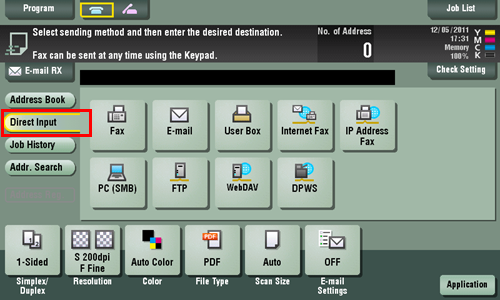
When finishing to enter a fax number, tap [Address Reg.].
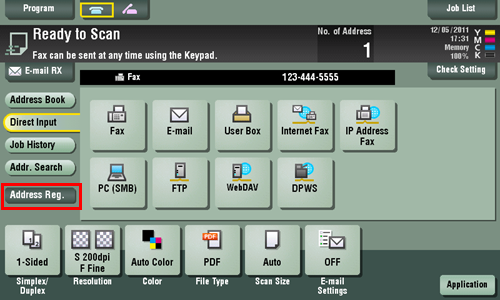
Select a fax number you want to register with the address book, then tap [New].
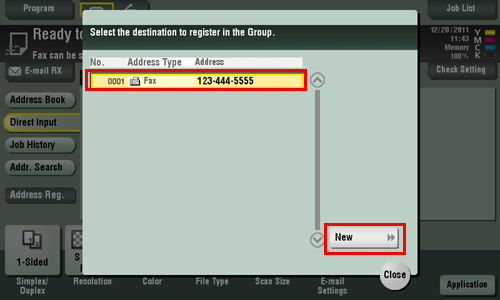
Tap the keyboard icon for [Name], and enter the registration name for the destination.
Add an index key or enter a sort character as necessary.
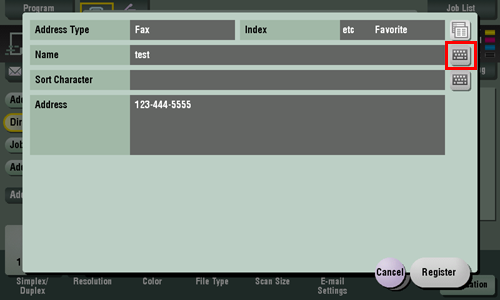
Settings
Description
[Address Type]
The destination type selected in the [Direct Input] are displayed.
[Index]
Select the appropriate character so that you can do an index search for fax numbers by registered name.
For a frequently used destination, select also [Favorite]. If [Favorite] is selected, the destination will appear in the top screen of the fax/scan mode, enabling the user to easily select a fax number.
[Name]
Enter the destination name that appears on the Touch Panel (using up to 24 characters).
Assign a name that helps you easily identify the fax number.
[Sort Character]
Enter the same name as the registered (using up to 24 characters).
You can sort fax numbers by name order.
[Address]
Displays directly entered fax numbers.
Tap [Register], then [Close].
When a fax has been sent to the directly entered fax number, tap [Address Book] and check that the fax number is registered.