User's Guide

Creating a Searchable PPTX File
When sending a PPTX file, create a searchable PPTX file using OCR character recognition technology.
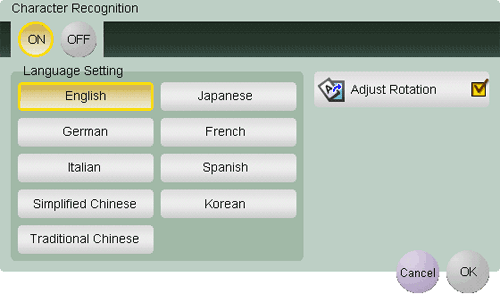
To enable searching of a PPTX file, select [PPTX] as the file type, and press [Character Recognition]. Then, configure the following settings.
| Settings | Description |
|---|---|
[ON]/[OFF] | Select [ON] to enable searching of a PPTX file. |
[Language Setting] | Select a language for OCR processing. Select the language used in the original to recognize text data properly. |
[Adjust Rotation] | Select this check box to automatically perform the rotation adjustment for each page based on the direction of text data detected by OCR processing. When the rotation adjustment is disabled, if the specified original orientation does not match the text direction, text data is not recognized correctly. |
Tips
- [Adjust Rotation] is not available when encryption using a digital certificate (digital ID) is enabled together.
- A searchable PPTX file cannot be created together with a PDF/A-based PDF file.
- If the following language is selected in [Language Setting], the text direction is recognized automatically.
- [Japanese], [Chinese], [Korean], [Traditional Chinese]
- When [Language Setting] is selected, if the vertical and horizontal directions are mixed in the same page of an original, they are recognized as either one direction.
- [Chinese], [Korean], [Traditional Chinese]