User's Guide

Encrypting a PDF File Using a Digital Certificate
Use a user's digital certificate (public key) to encrypt a PDF file when sending it. An encrypted PDF file can be decoded only with a user's secret key, preventing information from being leaked to a third party.

Tips
- Before using this function, register a user's digital certificate for encryption in the E-mail address of this machine. To register a certificate, use Web Connection. For details, refer to Here.
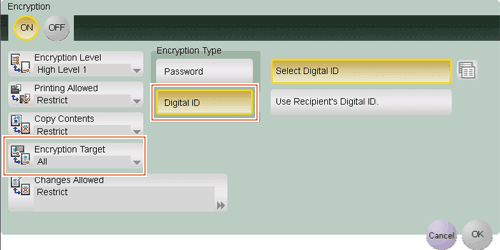
To encrypt a PDF file with a digital certificate, select [PDF] or [Compact PDF] as the file type, and press [PDF Detail Setting] - [Encryption]. Then, configure the following settings.
| Settings | Description |
|---|---|
[ON]/[OFF] | Select [ON] to encrypt a PDF file. |
[Encryption Type] | Select [Digital ID] to encrypt a PDF file with a digital certificate. Select [Select Digital ID], then tap the icon to display a list of E-mail addresses. From the list, select an E-mail address that contains a digital certificate for encryption. Selecting [User Recipient's Digital ID] uses a digital certificate registered in the PDF file sending destination. |
[Encryption Target] | Select a target file to be encrypted as required. Selecting [Other than Metadata] excludes property information specified in [PDF Document Properties] from encryption processing. For details on [PDF Document Properties], refer to Here. |
Tips
- When [Searchable PDF] is specified together, if the [Adjust Rotation] check box is selected in [Searchable PDF], it fails in an encryption with a digital certificate. The [Adjust Rotation] check box is selected in the default settings; therefore, change the setting.