User's Guide

How to Use Voice Guidance
Starting voice guidance
Display a screen that supports voice guidance, and press Voice Guide to start voice guidance. When voice guidance starts, you will hear a sound that signals the start of voice guidance.
To use the Voice Guide, slide the Control Panel to the left.

Voice guidance supports the following screens.
| Supported screen | Description |
|---|---|
Enlarge Display screen | Displayed when Enlarge Display is pressed. This machine provides a voice guidance, for example, when using copy or scan/fax mode, when a warning occurs, or when running. You will hear voice guidance for the following information.
|
Accessibility Settings screen | Displayed when [Accessibility Setting] of the Main Menu is tapped. You will hear voice guidance for the following information.
If necessary, you can specify the volume or replay speed of voice guidance. |
Guidance screen | Displayed when Guidance is pressed. You will hear voice guidance for the following information.
|
How to operate
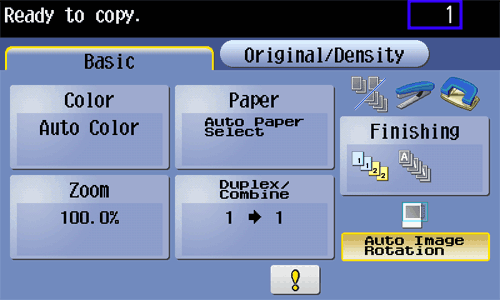
When voice guidance starts, the voice cursor (blue frame) is displayed to help you understand which part on the Touch Panel is currently explained at a glance.
If necessary, use the keypad to move the voice cursor, and select or determine an item.
Tips
- The voice cursor is not displayed in the screen that does not support the voice guidance function.
Operate voice guidance using the Keypad.
| Key | Function |
|---|---|
0 | Reads out how to operate the Keypad. |
1 | Reads out the explanation of the currently displayed screen. |
2 | Reads out the setting items configured by the currently displayed function. (Available only in copy or scan/fax mode in the Enlarge Display screen) |
3 | Stops the currently replayed voice guidance. |
4 | Moves the voice cursor to the left. |
5 | Select a key positioned by the voice cursor. |
6 | Moves the voice cursor to the right. |
7 | Reads out the setting items configured by the currently displayed function. (Available only in copy or scan/fax mode in the Enlarge Display screen) |
8 | Reads out the previously read-out information again. |
9 | Reads out the currently selected key. |
# | Turns up the volume one level. While voice guidance is running, you can press # or * to adjust the volume at any time. |
* | Turns down the volume one level. While voice guidance is running, you can press # or * to adjust the volume at any time. |
Tips
- If you press an invalid key on the currently displayed screen, you will hear voice guidance to signal that the key is not available.
Ending voice guidance
Press Voice Guide to end voice guidance.
Voice guidance is also ended when:
- You have logged out of this machine.
- The System Auto Reset function has been started.
- This machine has changed to the power save mode.
- The power has been turned off.