User's Guide

Registering User's Certificates Automatically on This Machine
Register a user's certificate used for encrypting E-mail message with S/MIME.
The following two methods are available for registering a user's certificate:
- Registering a user's certificate as destination registration information when the E-mail address is registered on this machine.
- Sending an E-mail attached with a digital signature (user's certificate) to this machine to register the certificate automatically in this machine using S/MIME function.
The following describes the method to send an E-mail attached with digital signature (user's certificate) to this machine for automatic registration.
- Before registering the certificate, you must register on this machine the E-mail address of the user whose certificate you wish to register.
- This machine must be able to receive E-mail messages.
- In the administrator mode, select [Network] - [E-mail Setting] - [S/MIME], then configure the following settings.
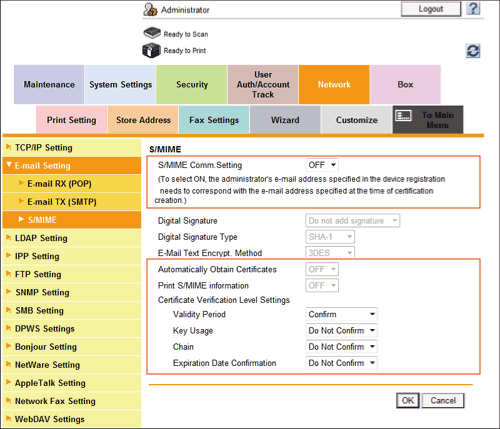
Settings Description [S/MIME Comm. Setting]Select [ON] to use the S/MIME.To select [ON], the E-mail address of the certificate of this machine must match the E-mail address of the administrator.[OFF] is specified by default.[Automatically Obtain Certificates]To register digital signature (user's certificate), select [ON].[OFF] is specified by default.[Print S/MIME information]Select whether to print the S/MIME information, if necessary.[OFF] is specified by default.[Certificate Verification Level Settings]To verify the certificate, select items to be verified.If you select [Confirm] at each item, the certificate is verified for each item.[Validity Period]Confirm whether the certificate is still valid.[Confirm] is specified by default.[Key Usage]Confirm whether the certificate is used according to the intended purpose approved by the certificate issuer.[Do Not Confirm] is specified by default.[Chain]Confirm whether there is a problem in the certificate chain (certificate path).The chain is validated by referencing the external certificates managed on this machine.[Do Not Confirm] is specified by default.[Expiration Date Confirmation]Confirm whether the certificate has expired.Confirm for expiration of the certificate in the following order.- OCSP (Online Certificate Status Protocol) service
- CRL (Certificate Revocation List)
[Do Not Confirm] is specified by default. - Send the E-mail attached with digital signature from the computer to this machine.
The certificate received by this machine is automatically registered when the E-mail address registered in that certificate matches the user's E-mail address registered on this machine.