User's Guide

Registering the Sender Information
Register the machine name, your company name (sender name), and the fax number that are to be printed as sender information when faxes are transmitted.
TTI information is automatically added to a fax to be sent from this machine. Up to 20 sender names can be registered. You can use different names for different purposes depending on the destination.
In the administrator mode, select [Fax Settings] - [Header Information], then configure the following settings.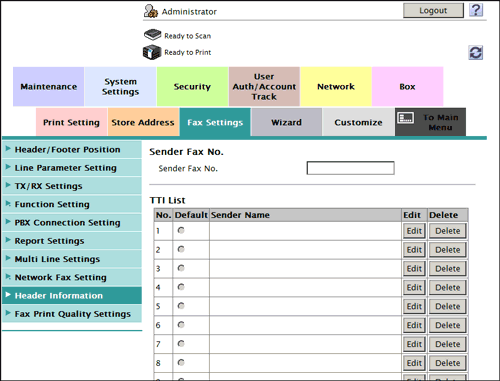
| Settings | Description | |
|---|---|---|
[Sender Fax No.] | Enter the fax number of this machine (using up to 20 digits, including symbols #, *, +, and spaces). The fax number you entered is printed as a TTI. | |
[Default] | Select the default setting for the sender name. The sender name, which is specified by default, is automatically added when a fax is sent. If an additional line is connected to your machine, you can select, in the administrator mode [Fax Settings] - [TX/RX Settings] - [Individual Sender Line Setup] to configure default sender name setting by line. | |
[Sender Name] | Displays registered sender names. | |
[Edit] | You can register up to 20 sender names. Use this option to use different sender names depending on the destination. | |
[No.] | Displays the registration number. | |
[Sender Name] | Enter a sender name (using up to 30 characters). If an additional line is connected to your machine, you can select, in the administrator mode [Fax Settings] - [TX/RX Settings] - [Individual Sender Line Setup] to use a sender name setting by line. | |
[Delete] | Click this button to delete the registered sender name. | |