User's Guide

To display:
- [Scan/Fax]
- [Application]
- [Quality/Density]
- [Bkgd. Removal]
- [Quality/Density]
- [Application]
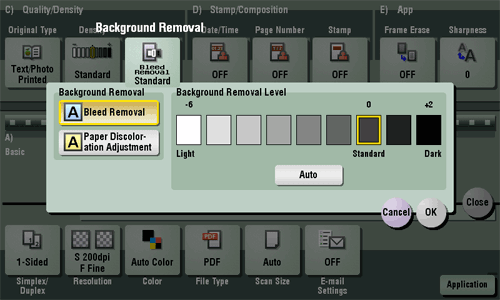
Adjust the density of the original with the colored background (newsprints, recycle paper, etc.) or the background of an original that is so thin that text or images on the back would be scanned.
| Settings | Description |
|---|---|
[Background Removal] | Press this button to scan a thin 2-sided original or an original with a colored background at the optimal level of image quality.
|
[Background Removal Level] | Press this button to adjust the density of the background color for an original with a colored background. Selecting [Auto] automatically determines the density of the background color, and scans an original at the optimum background density. |