To display:
- [Box]
- [System]
- [Annotation]
- Select a User Box to save the file
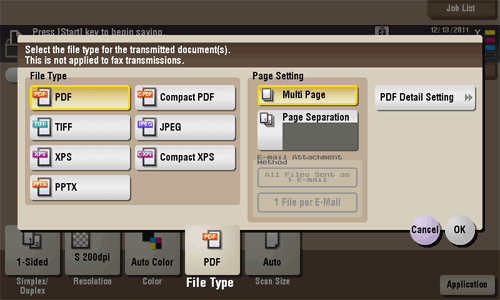
Select the file type used for saving the scanned data.
| Settings | Description |
|---|
[File Type] | Select the desired saving file type from the following: - [PDF]: A type available in most operating systems, which allows you to assign a password to a file or encrypt a file. Important original data should be saved as a PDF file.
- [Compact PDF]: Used to save a file with a smaller file size than the normal PDF type. We recommend this format when you want to reduce file size to enable sending by E-mail etc.
- [TIFF]: This is one type of versatile image formats. TIFF format supports multiple pages, in which multi-page documents can be saved as single file.
- [JPEG]: A file type to save a file commonly used for a digital camera, which is suitable for saving photos. JPEG format does not support the saving of multiple pages as a single file.
- [XPS]: A file type supported by Windows Vista and later OSs.
- [Compact XPS]: Used to save a file with a smaller file size than the normal XPS type.
- [PPTX]: Extension of an XML-base file that is created with PowerPoint of Microsoft Office 2007 or later.
|
[Page Setting] | Press this button to select a filing page unit when an original consists of multiple pages. - [Multi Page]: Used to convert all pages to a single file. However, if [File Type] is set to [JPEG], you cannot select [Multi Page].
- [Page Separation]: Used to convert the specified number of pages as a single file. For example, if you enter "2" to scan 10 original pages, they are separated into five files.
|
[E-mail Attachment] | You can select the E-mail attachment method when [Page Setting] is set to [Page Separation]. - [Send All as 1 E-mail]: Attaches all files to one E-mail.
- [1 File per E-Mail]: Sends one E-mail for each file.
|
[PDF Detail Setting] | If the file type is set to [PDF] or [Compact PDF], you can set the PDF options. You can enhance security by attaching a digital signature that identifies the author of the file, by file encryption, etc. For details, refer to Here. |
