User's Guide

To display:
- [Box]
- [System]
- [Secure Print]
- Select the file
- [Print]
- [Application]
- [Copy Security]
- [Password Copy]
- [Copy Security]
- [Application]
- [Print]
- Select the file
- [Secure Print]
- [System]
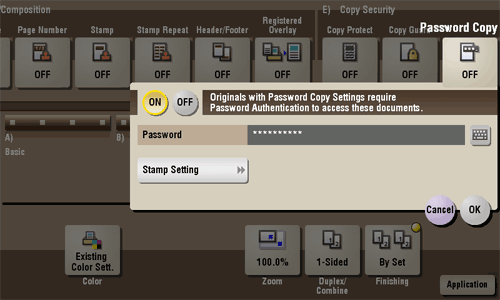
Password Copy is a copy protection function that prints concealed security watermarks such as "Private" or a date in the background to prevent unauthorized copying, and embeds a password for the password copy function on all printed sheets.
| Settings | Description | |
|---|---|---|
[ON]/[OFF] | Select [ON] to embed a password. | |
[Password] | Enter the password to restrict copying. | |
[Stamp Setting] | Set a stamp to be printed on each sheet of paper. | |
[Stamp Text] | Select a stamp used. The date and time can also be printed.
| |
[Stamp Selection] | The registration status of the stamp is displayed. | |
[Detail Setting] | If necessary, select the print size and text color. | |
[Password Copy] | Specify the contrast of password copy guard pattern if necessary. | |
[Background Pattern] | Select a background pattern. | |
Tips
- You can use the Password Copy function when the Security Kit is installed and the Password Copy function is enabled on this machine.
- The Password Copy function does not support color paper, envelopes and transparencies.