User's Guide

To display:
- [Box]
- [System]
- [Secure Print]
- Select the file
- [Print]
- [Application]
- [Layout]
- [Page Margin]
- [Layout]
- [Application]
- [Print]
- Select the file
- [Secure Print]
- [System]
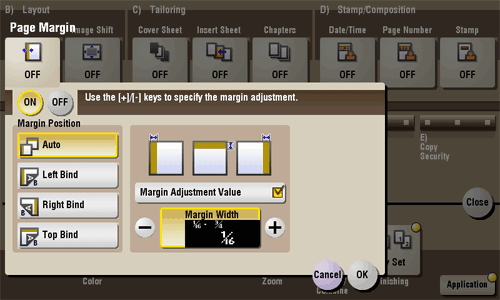
Set a binding position and a margin of each page.
| Settings | Description |
|---|---|
[ON]/[OFF] | Select [ON] to set a page margin. |
[Margin Position] | Select the paper binding position.
|
[Margin Adjustment Value] | Adjust the page margin in the range 1/16 inch to 3/4 inch (0.1 mm to 20.0 mm). Adjust it by tapping [+]/[-] for the inch area, or by tapping [+]/[-] or pressing the Keypad for the centimeter area. |