User's Guide

To display:
- [Utility]
- [Administrator Settings]
- [System Settings]
- [Expert Adjustment]
- [Printer Adjustment]
- [Centering (Duplex 2nd Side)]
- [Printer Adjustment]
- [Expert Adjustment]
- [System Settings]
- [Administrator Settings]
Adjust the print start position at the left edge of the paper relative to the paper discharge direction for printing the back side in 2-sided printing.
Press Start to print a test pattern. Check the test pattern and adjust so that the margin between the left edge of the paper and the print start position is 3/16 inches (4.2 mm) (+/-1/32 inch (+/-0.5 mm)). Repeat adjustments, as required.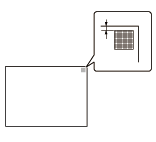
| Settings | Description |
|---|---|
[Select Tray] | Select a paper tray that is used to adjust the start position for printing. |
[Adjust Value] | Enter an adjustment value between -3.0 and +3.0 mm by tapping [-] and [+]. [0.0 mm] is specified by default. |
Tips
- Only 8-1/2
 11
11  (A4 ) paper can be used for adjusting the Bypass Tray.