User's Guide

To display:
- [Copy]
- [Application]
- [Stamp/Composition]
- [Registered Overlay]
- [Stamp/Composition]
- [Application]
In [Register Overlay], register original images on the hard disk of this machine as overlay image.
You can call a registered overlay image and compose it on an original scanned later.
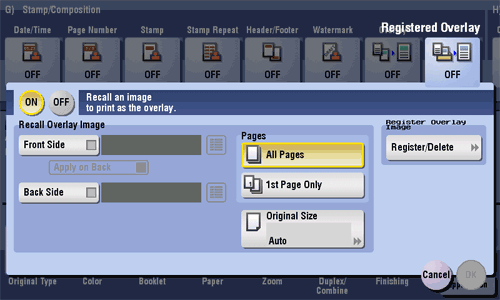
| Settings | Description |
|---|---|
[ON]/[OFF] | Select [ON] to register a new overlay image or compose a registered overlay image on the original. |
[Recall Overlay Image] | Specify which side of the paper to compose the overlay image, and select an overlay image to be composed. Check the density, composition method, color change, and preview of overlay image if necessary. If you set [Apply on Back], the image on the front side is composed on the back side of paper. |
[Pages] | Select the range of pages on which an overlay image is composed. |
[Original Size] | Specify the size of the original. If the original is of a standard size, selecting [Auto] causes the machine to automatically detect the size. If the machine cannot detect the size of irregular sized originals or photos, manually specify the size. |
[Register Overlay Image] | Register a new overlay image. If necessary, select the density and color of the overlay image when it is registered.
|