User's Guide

To display:
- [Copy]
- [Application]
- [Stamp/Composition]
- [Overlay]
- [Stamp/Composition]
- [Application]
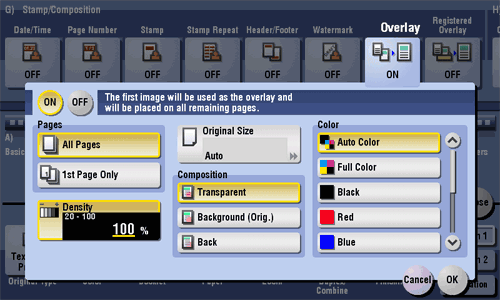
The original image scanned in the first page is overlaid on the originals scanned in the subsequent pages.
| Settings | Description |
|---|---|
[ON]/[OFF] | Select [ON] to compose an overlay image. |
[Pages] | Select the range of pages on which an overlay image is composed. |
[Density] | If necessary, adjust the density of the overlay image to be composed. |
[Original Size] | If the size of the original is not detected correctly, select a key indicating the size of the original to be scanned. If the machine cannot detect the size of irregular sized originals or photos, manually specify the size. |
[Composition] | Select how to compose an overlay image.
|
[Color] | If necessary, select the print color of the overlay image to be composed. |