User's Guide

To display:
- [Scan/Fax]
- [Direct Input]
Enter destination information according to the saving and transmission mode.
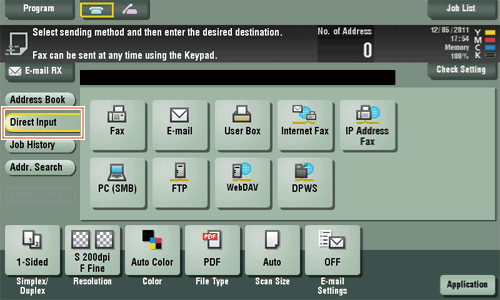
| Settings | Description |
|---|---|
[Fax] | Enter a destination fax number when scanned original data is sent by fax. |
[E-mail] | Enter a destination E-mail address when scanned original data is sent by E-mail attachment. |
[User Box] | Select a user box to save scanned original data in the user box of this machine. |
[Internet Fax] | Enter a destination E-mail address when scanned original data is sent by Internet fax. |
[IP Address Fax] | Enter a destination IP address or E-mail address when scanned original data is sent by IP address fax. |
[PC (SMB)] | Enter a destination computer name (host name) or IP address when scanned original data is sent to a share folder of a computer on the network. |
[FTP] | Enter a destination FTP server host name or IP address when scanned original data is sent to a FTP server. |
[WebDAV] | Enter a destination WebDAV server host name or IP address when scanned original data is sent to a WebDAV server. |
[DPWS] | Enter a destination computer when scanned original data is sent to a computer detected by the Web service. |
[Scan Server] | Forward scanned original data to another location (secondary delivery) via a scan server. When selecting a destination, select an arbitrary PSP (Post-Scan-Process). In PSP, destinations for secondary delivery etc. are registered. |
Reference
- You can register the destination that you have entered directly into the address book. For details on how to register, refer to Here.