
Spooling Print Data on the Server (My Print Manager)
My Print Manager
My Print Manager is application software used to build a universal print environment.
Using My Print Manager allows a user to spool print data on the server. A user can select any MFPs and download print data from the server to print.

However, a user needs to separately purchase My Print Manager and build a server-client environment in advance. For details, refer to the My Print Manager manual.
How to print from the computer
To spool print data on the server, specify a virtual printer as the target printer. For details on a virtual printer, refer to the My Print Manager manual.
Open the data using application software, then select the print function from the menu.
Specify a virtual printer as the target printer.
Execute printing.
Print data is spooled on the server.
Operations on this machine
Enter the user name and password.
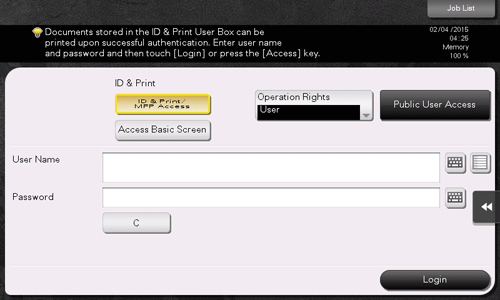
Check that [ID & Print/MFP Access] is selected in [ID & Print], and tap [Login].
When you select [Access Basic Screen] in [ID & Print], you can log in without starting printing.
You can change the default value for [ID & Print] (Default: [ID & Print/MFP Access]) if necessary. For details, refer to Here.
If authentication succeeds, all the spooled data is printed.

To print only a particular data item, open the ID & Print User Box, then select the data item. For details, refer to the My Print Manager manual.
