Paper Jam in ADF
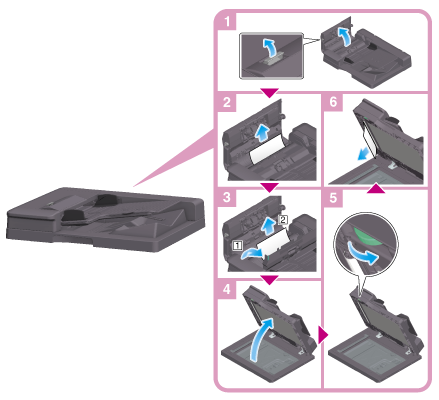
For Reverse Automatic Document Feeder DF-632
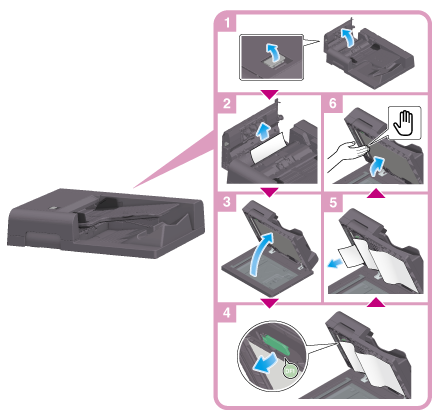
For Reverse Automatic Document Feeder DF-714
 NOTICE
 When closing the Opening and Closing Guide, press the Hand mark in the center and check that it is locked securely.
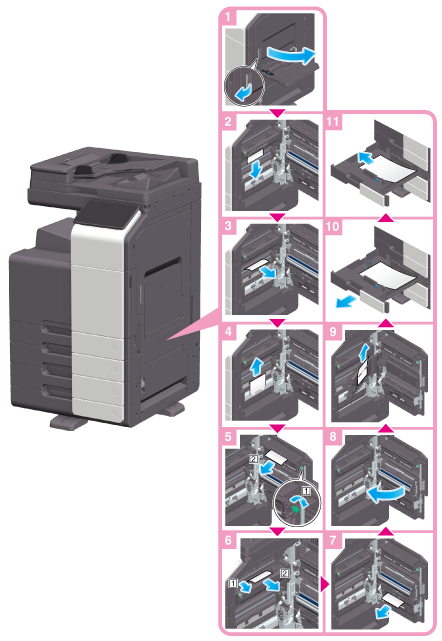
Paper Jam at Right-side Door
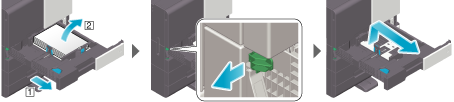
When removing pieces of paper in the paper tray (Tray 1/2)
Release the lock as shown in the figure, pull out the paper tray, then remove any unnecessary pieces of paper.
 CAUTION
- The inside of this product has areas subject to high temperature, which may cause burns. When checking the inside of the unit for malfunctions such as a paper misfeed, do not touch the locations (around the fusing unit, etc.) which are indicated by a "Caution HOT" caution label. A burn could result.
Paper Jam in Paper Tray
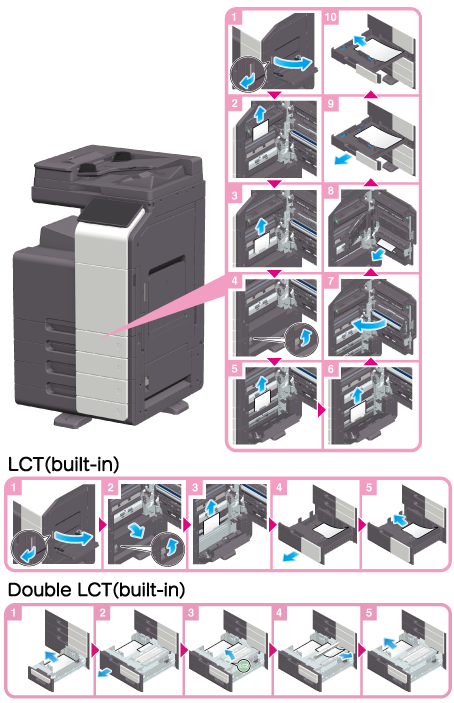
When removing pieces of paper in the paper tray (Tray 1/2)
Release the lock as shown in the figure, pull out the paper tray, then remove any unnecessary pieces of paper.
NOTICE- Be careful not to touch the surface of the Transport Roller with your hand.
CAUTION- The inside of this product has areas subject to high temperature, which may cause burns. When checking the inside of the unit for malfunctions such as a paper misfeed, do not touch the locations (around the fusing unit, etc.) which are indicated by a "Caution HOT" caution label. A burn could result.
Paper Jam in Large Capacity Unit
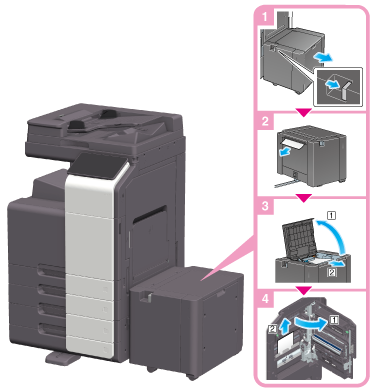 NOTICE
- Be careful not to touch the surface of the roller with your hand.
CAUTION- The inside of this product has areas subject to high temperature, which may cause burns. When checking the inside of the unit for malfunctions such as a paper misfeed, do not touch the locations (around the fusing unit, etc.) which are indicated by a "Caution HOT" caution label. A burn could result.
Paper Jam in Finisher FS-539 or Finisher FS-539 SD
Sections inside the finisher prone to paper jams vary depending on the settings for [Finishing].
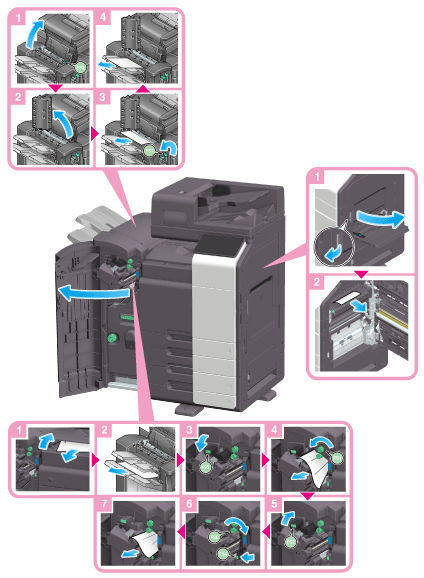
 Tips
Tips- The figure shows the Finisher FS-539 SD equipped with Punch Kit PK-524 and Relay Unit RU-513.
CAUTION- The inside of this product has areas subject to high temperature, which may cause burns. When checking the inside of the unit for malfunctions such as a paper misfeed, do not touch the locations (around the fusing unit, etc.) which are indicated by a "Caution HOT" caution label. A burn could result.
Sections inside the finisher prone to paper jams vary depending on the settings for [Finishing].
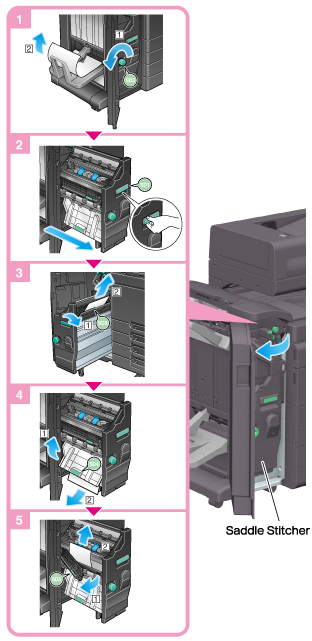 Tips
Tips- The figure shows the Finisher FS-539 SD equipped with Punch Kit PK-524 and Relay Unit RU-513.
NOTICE- When moving the Saddle Stitcher, be sure to only hold the handle. Otherwise, your hand or finger may get caught in the machine.
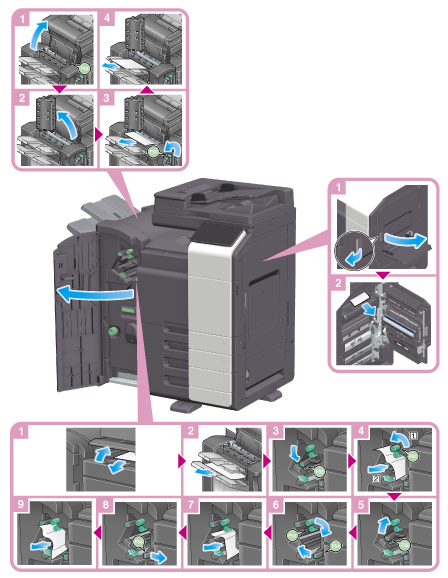
Paper Jam in Finisher FS-536 or Finisher FS-536 SD
Sections inside the finisher prone to paper jams vary depending on the settings for [Finishing].
 Tips
Tips- The figure shows the Finisher FS-536 SD equipped with Punch Kit PK-520 and Relay Unit RU-513.
CAUTION- The inside of this product has areas subject to high temperature, which may cause burns. When checking the inside of the unit for malfunctions such as a paper misfeed, do not touch the locations (around the fusing unit, etc.) which are indicated by a "Caution HOT" caution label. A burn could result.
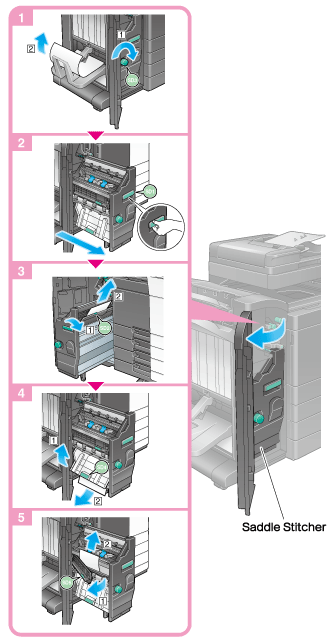
Sections inside the finisher prone to paper jams vary depending on the settings for [Finishing].
 Tips
Tips- The figure shows the Finisher FS-536 SD equipped with Punch Kit PK-520 and Relay Unit RU-513.
NOTICE- When moving the Saddle Stitcher, be sure to only hold the handle. Otherwise, your hand or finger may get caught in the machine.
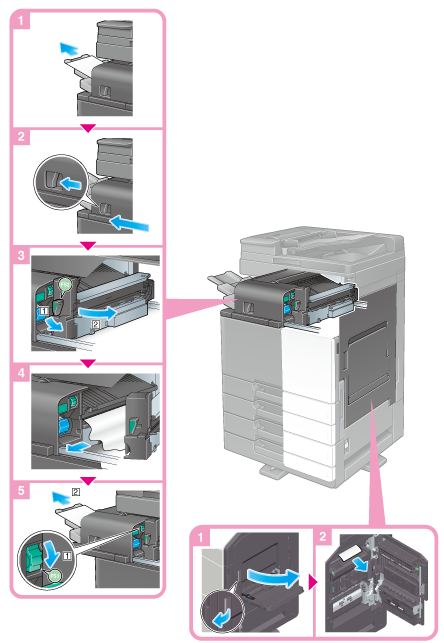
Paper Jam in Finisher FS-533
Sections inside the finisher prone to paper jams vary depending on the settings for [Finishing].
 Tips
Tips- The figure shows the Finisher FS-533 equipped with Punch Kit PK-519.
CAUTION- The inside of this product has areas subject to high temperature, which may cause burns. When checking the inside of the unit for malfunctions such as a paper misfeed, do not touch the locations (around the fusing unit, etc.) which are indicated by a "Caution HOT" caution label. A burn could result.
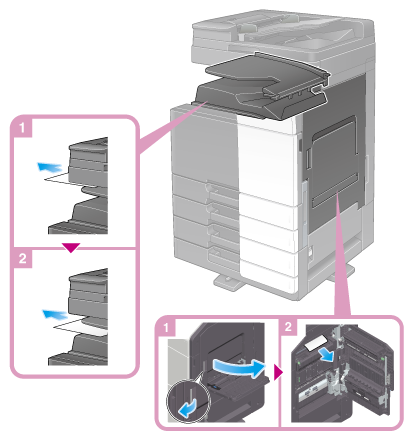
Paper Jam in Job Separator JS-506
 CAUTION
- The inside of this product has areas subject to high temperature, which may cause burns. When checking the inside of the unit for malfunctions such as a paper misfeed, do not touch the locations (around the fusing unit, etc.) which are indicated by a "Caution HOT" caution label. A burn could result.