
Administrator settings of LK-114_SetupTool
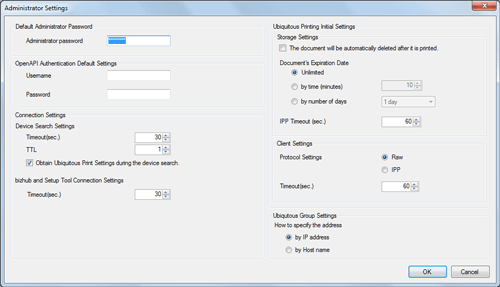
Click [Administrator Settings] on the [Settings] menu to initialize LK-114_SetupTool.
Settings | Description |
|---|---|
[Default Administrator Password] | Specify the default bizhub administrator password. The value specified in this field is displayed as the default on a page that requires entry of the administrator password. |
[OpenAPI Authentication Default Settings] | Specify the default user name and password for OpenAPI authentication. Specify them when using the user name and password for OpenAPI authentication. The value specified in this field is displayed as the default on a page that requires entry of the user name and password for OpenAPI authentication. |
[Connection Settings] | Configure communication settings such as MFP search time or communication timeout (sec.) between MFP and LK-114_SetupTool |
[Ubiquitous Printing Initial Settings] | Specify the default values that are to be sent to an MFP with new universal print settings required. |
[Ubiquitous Group Settings] | Specify the default method to specify the address of each of MFPs that make up a universal print group. |